Supervision (optional)
This feature depends on the system configuration.
If push notifications are activated, this feature is not available when the ALE SoftPhone application is running in background.
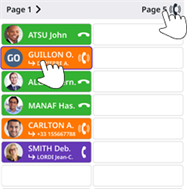
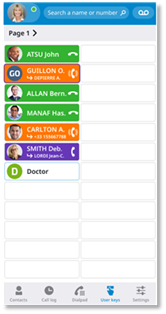
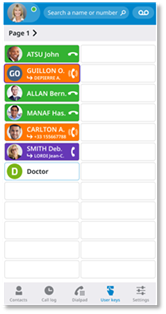
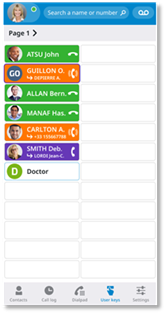
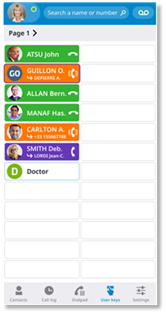
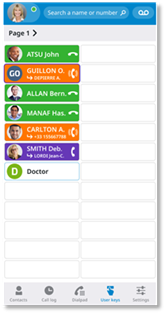
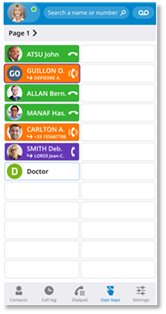
You can monitor business call numbers. This means that you can pick up an incoming call from a monitored contact when their phone is ringing. The administrator must configure contacts you monitor. All supervised contacts are displayed as programmed keys (tab: User keys).
Click on the key to call the monitored contact.
Supervised contact telephony status
The telephony status of the supervised contact is represented by the icon being displayed and the background color of the key.
|
·
·
·
·
·
·
|
|


Pick up an incoming call for a monitored contact
|
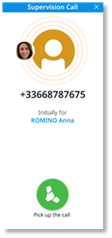
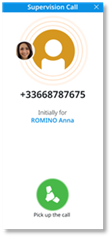
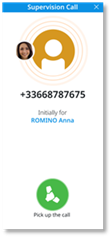
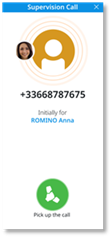
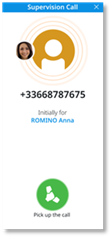
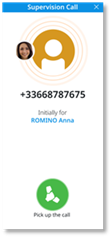
If the option is enabled in the application settings, a pop-up alerts you and displays the following information when a monitored contact is receiving an incoming call: · Caller name or number. · Supervisee name receiving the call. |
|
|
|
Available actions: |
||
|
|
Pick up the call. |
|
|
|
Close the incoming call window. Your mobile phone no longer rings, but all other devices, such as a desk phone in the case of multiple devices, continue to ring. |
|



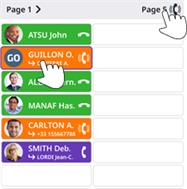
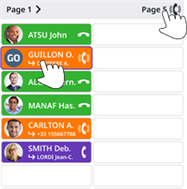
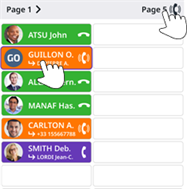
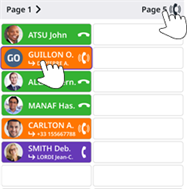
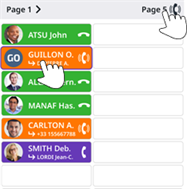
You can also pick up the call from your Programmable keys and Supervision tab.
|
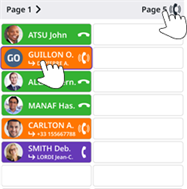
Tap the tab: Programmable keys and Supervision. |
|
|
· Select this page. · Select the key (orange = ringing). The caller is displayed under the monitored contact's name. · You are in communication with the caller. |
|


Supervision (en option)
Cette fonctionnalité dépend de la configuration du système.
Si les notifications push sont activées, cette fonctionnalité n'est pas disponible lorsque l'application ALE SoftPhone est exécutée en arrière-plan.
Vous pouvez surveiller les numéros d'appels professionnels. Cela signifie que vous pouvez prendre un appel entrant d'un contact surveillé lorsque son téléphone sonne. L'administrateur doit configurer les contacts que vous surveillez. Tous les contacts supervisés sont affichés comme des touches programmées (Onglet : Touches).
Cliquer sur la touche pour appeler le contact surveillé.
Statut téléphonique du contact supervisé
Le statut téléphonique du contact supervisé est représenté par l'icône affichée et la couleur de fond de la touche.
|
·
·
·
·
·
·
|
|

 Libre (vert) : le contact
surveillé est inactif ou hors service.


Prendre un appel entrant pour un contact surveillé
|
Si l'option est activée dans les paramètres de l'application, une fenêtre contextuelle vous avertit et affiche les informations suivantes lorsqu'un contact surveillé reçoit un appel entrant : · Le nom ou le numéro de l'appelant. · Nom du supervisé qui reçoit l'appel. |
|
|
|
Actions disponibles : |
||
|
|
Prendre l'appel. |
|
|
|
Fermer la fenêtre de l'appel entrant. Votre téléphone mobile ne sonne plus, mais tous les autres appareils, comme un téléphone de bureau en cas d'appareils multiples, continuent de sonner. |
|



Vous pouvez également prendre l'appel à partir de vos touches programmables et de l'onglet Supervision.
|
Taper sur l'onglet : Touches programmables et supervision. |
|
|
· Sélectionner cette page. · Sélectionner la touche (orange = sonnerie). L'appelant est affiché sous le nom du contact surveillé. · Vous êtes en communication avec l'appelant. |
|


Leitung (optional)
Diese Funktion ist von der Systemkonfiguration abhängig.
Wenn Push-Benachrichtigungen aktiviert sind, ist diese Funktion nicht verfügbar, wenn die ALE SoftPhone-Anwendung im Hintergrund läuft.
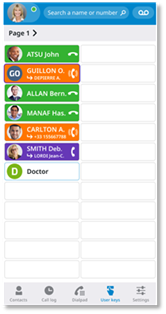
Sie können geschäftliche Rufnummern überwachen. Das bedeutet, dass Sie einen eingehenden Anruf von einem überwachten Kontakt annehmen können, wenn dessen Telefon klingelt. Der Administrator muss die von Ihnen überwachten Kontakte konfigurieren. Alle überwachten Kontakte werden als programmierte Tasten angezeigt (Registerkarte: Tasten).
Klicken Sie auf die Taste, um den überwachten Kontakt anzurufen.
Telefonie-Status des überwachten Kontakts
Der Telefonie-Status des überwachten Kontakts wird durch das angezeigte Symbol und die Hintergrundfarbe der Taste dargestellt.
|
·
·
·
·
·
·
|
|


Einen eingehenden Anruf für einen überwachten Kontakt entgegennehmen
|
Wenn die Option in den Einstellungen der Anwendung aktiviert ist, werden Sie durch ein Popup-Fenster gewarnt und die folgenden Informationen werden angezeigt, wenn ein überwachter Kontakt einen eingehenden Anruf erhält: · Name oder Nummer des Anrufers. · Name des Mitarbeiters, die den Anruf erhält. |
|
|
|
Verfügbare Aktionen: |
||
|
|
Anruf annehmen. |
|
|
|
Fenster 'Eingehender Anruf' schließen. Das Mobiltelefon klingelt nicht mehr, aber alle anderen Geräte, wie z. B. ein Tischtelefon bei mehreren Geräten, klingeln weiter. |
|



Sie können den Anruf auch über Ihre programmierbaren Tasten und die Registerkarte 'Überwachung' annehmen.
|
Tippen Sie auf die Registerkarte: Programmierbare Tasten und Steuerung. |
|
|
· Wählen Sie diese Seite aus. · Wählen Sie die Taste aus (orange = Rufton). Der Anrufer wird unter dem Namen des überwachten Kontakts angezeigt. · Sie sind mit dem Anrufer verbunden. |
|


Supervisión (opcional)
Esta función depende de la configuración del sistema.
Si las notificaciones automáticas están activadas, esta función no está disponible cuando la aplicación ALE SoftPhone se ejecuta en segundo plano.
Se pueden monitorear los números de llamada de empresa. Esto significa que se puede atender una llamada entrante de un contacto monitoreado cuando su teléfono está sonando. El administrador debe configurar los contactos que se monitorean. Todos los contactos monitoreados se muestran como teclas programadas (Ficha: Teclas de usuario).
Pulsar la tecla para llamar al contacto monitoreado.
Estado de telefonía del contacto supervisado
El estado de telefonía del contacto supervisado se representa mediante el icono que se muestra y el color de fondo de la tecla.
|
·
·
·
·
·
·
|
|

 Libre (verde): el contacto
monitoreado está inactivo o fuera de servicio.


Atender una llamada entrante para un contacto monitoreado
|
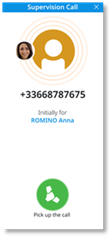
Si la opción está activada en la configuración de la aplicación, una ventana emergente le avisa y muestra la siguiente información cuando un contacto supervisado recibe una llamada entrante: · Nombre o número de la persona que llama. · Nombre de la persona supervisada que recibe la llamada. |
|
|
|
Acciones disponibles: |
||
|
|
Atender la llamada. |
|
|
|
Cerrar la ventana de llamada entrante. Su teléfono móvil deja de sonar, pero todos los demás dispositivos, como el teléfono de sobremesa en caso de que haya varios dispositivos, siguen sonando. |
|



También puede atender la llamada desde las teclas programables y la pestaña de supervisión.
|
Pulsar la pestaña: Supervisión y teclas programables. |
|
|
· Seleccionar esta página. · Seleccionar la tecla (naranja = timbre). La persona que llama aparece bajo el nombre del contacto monitoreado. · Se está en comunicación con la persona que llama. |
|


Supervisione (opzionale)
Questa funzione dipende dalla configurazione del sistema.
Se le notifiche push sono attivate, questa funzione non è disponibile quando l'applicazione ALE SoftPhone è in esecuzione in background.
È possibile monitorare i numeri delle chiamate aziendali. Questo significa che si può rispondere a una chiamata in arrivo da un contatto monitorato quando il suo telefono sta squillando. L'amministratore deve configurare i contatti da monitorare. Tutti i contatti supervisionati sono visualizzati come tasti programmati (Scheda: Tasti utente).
Cliccare sul tasto per chiamare il contatto monitorato.
Stato di telefonia del contatto supervisionato
Lo stato di telefonia del contatto supervisionato è rappresentato dall'icona visualizzata e dal colore di sfondo del tasto.
|
·
·
·
·
·
·
|
|


Rispondere a una chiamata in entrata per un contatto monitorato
|
Se l'opzione è attivata nelle impostazioni dell'applicazione, una finestra di pop-up avvisa l'utente e consente di visualizzare le informazioni seguenti quando un contatto monitorato riceve una chiamata in arrivo: · Nome o numero del chiamante. · Nome del supervisore che riceve la chiamata. |
|
|
|
Azioni disponibili: |
||
|
|
Rispondere alla chiamata. |
|
|
|
Chiudere la finestra della chiamata in entrata. Il cellulare non squilla più, ma tutti gli altri dispositivi, come un telefono fisso in caso di dispositivi multipli, continuano a squillare. |
|



È anche possibile rispondere alla chiamata dai tasti programmabili e dalla scheda Supervisione.
|
Toccare la scheda: Tasti programmabili e supervisione. |
|
|
· Selezionare questa pagina. · Selezionare il tasto (arancione = squillo). Il chiamante viene visualizzato sotto il nome del contatto monitorato. · È in corso una comunicazione con il chiamante. |
|


Supervisie (optioneel)
Deze functie is afhankelijk van de systeemconfiguratie.
Als pushmeldingen zijn geactiveerd, is deze functie niet beschikbaar wanneer de ALE SoftPhone-toepassing op de achtergrond draait.
U kunt zakelijke telefoonnummers controleren. Dit betekent dat u een inkomende oproep van een bewaakt contact kunt aannemen als zijn telefoon overgaat. De beheerder moet de contactpersonen configureren die u bewaakt. Alle bewaakte contactpersonen worden weergegeven als geprogrammeerde toetsen (tab: Gebruikerssleutels).
Klik op de toets om het bewaakte contact te bellen.
Telefoniestatus onder toezicht
De telefoniestatus van het contact onder toezicht wordt weergegeven door het getoonde pictogram en de achtergrondkleur van de toets.
|
·
·
·
·
·
·
|
|


Een inkomende oproep aannemen voor een bewaakt contact
|
Als de optie is ingeschakeld in de toepassingsinstellingen, waarschuwt een pop-up u en toont deze de volgende informatie als een bewaakt contact een inkomende oproep ontvangt: · Naam of nummer van beller. · Naam van bewaakte persoon die de oproep ontvangt. |
|
|
|
Beschikbare handelingen: |
||
|
|
Oproep beantwoorden. |
|
|
|
Venster voor inkomende oproepen sluiten. Uw mobiele telefoon gaat niet meer over, maar alle andere apparaten, zoals een bureautelefoon bij meerdere apparaten, blijven overgaan. |
|



Kunt u de oproep ook beantwoorden via uw programmeerbare toetsen en tabblad Supervisie.
|
Tik op het tabblad: Programmeerbare toetsen en Toezicht. |
|
|
· Deze pagina selecteren. · Deze toets selecteren (oranje = bellen). De beller wordt weergegeven onder de naam van het bewaakte contact. · U communiceert met de beller. |
|


Supervisão (opcional)
Esta funcionalidade depende da configuração do sistema.
Se as notificações push estiverem ativadas, esta funcionalidade não estará disponível quando a aplicação ALE SoftPhone estiver a ser executada em segundo plano.
Pode monitorizar números de chamada de negócios. Isto significa que pode atender uma chamada de um contacto monitorizado quando esse telefone estiver a tocar. O administrador tem de configurar os contactos que monitoriza. Todos os contactos supervisionados são mostrados como teclas programadas (Separador: Chaves de utilizador).
Clicar na tecla para ligar ao contacto monitorizado.
Estado da telefonia de contacto supervisionado
O estado da telefonia do contacto supervisionado é representado pelo ícone apresentado e pela cor de fundo da tecla.
|
·
·
·
·
·
·
|
|

 Livre (verde): o contacto
monitorizado está inativo ou fora de serviço.


Interceptar uma chamada recebida para um contacto monitorizado
|
Se a opção estiver ativada nas definições da aplicação, um pop-up alerta-o e apresenta a seguinte informação quando um contacto monitorizado está a receber uma chamada: · Nome ou número de quem faz a chamada. · Nome do supervisionado que recebe a chamada. |
|
|
|
Ações disponíveis: |
||
|
|
Atender a chamada. |
|
|
|
Fechar a janela de chamada recebida. O telemóvel já não toca, mas todos os outros dispositivos como, por exemplo, um telefone de secretária no caso de vários dispositivos, continuam a tocar. |
|



Também pode atender a chamada a partir do separador Teclas programáveis e Supervisão.
|
Toque no separador: Teclas programáveis e supervisão. |
|
|
· Selecionar esta página. · Selecionar a tecla (cor de laranja = a tocar). O autor da chamada é apresentado com o nome do contacto monitorizado. · Está em comunicação com o autor da chamada. |
|