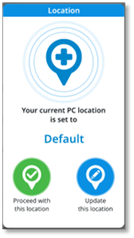
Set your location
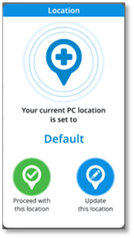
Depending on the options enabled in the settings, a pop-up is displayed when you start the application and/or your network changes, requesting your current PC location: Default, Home, Other.
|
Your current location is displayed. |
|
|
|
Available actions: |
||
|
|
Proceed with this location Send the current location to the VNA server and close the pop-up. |
|
|
|
Update this location Open the location pop-up to select, create or modify the new location. |
|
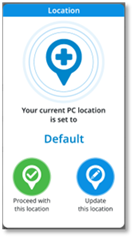


Définir l'emplacement
En fonction des options activées dans les réglages, une fenêtre contextuelle s'affiche au démarrage de l'application et/ou en cas de changement de réseau, demandant l'emplacement actuel de votre PC : Défaut, Domicile, Autre.
|
Votre position actuelle s'affiche. |
|
|
|
Actions disponibles : |
||
|
|
Poursuivre avec cette localisation Envoyer l'emplacement actuel au serveur VNA et fermer la fenêtre contextuelle. |
|
|
|
Mettre à jour cette localisation Ouvrir la fenêtre contextuelle de localisation pour sélectionner, créer ou modifier le nouvel emplacement. |
|
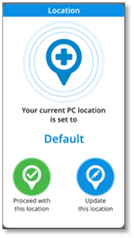


Ihren Standort festlegen
Je nach den in den Einstellungen aktivierten Optionen wird beim Starten der Anwendungund/oder beim Wechsel des Netzwerks ein Popup-Fenster angezeigt,in dem Ihr aktueller PC-Standortabgefragt wird: Standard, Privatadresse, Anderer.
|
Ihr aktueller Standort wird angezeigt. |
|
|
|
Verfügbare Aktionen: |
||
|
|
Mit diesem Standort fortfahren Den aktuellen Standort an den VNA-Server senden und das Popup-Fenster schließen. |
|
|
|
Diesen Standort aktualisieren Das Popup-Fenster zum Auswählen, Erstellen oder Ändern des neuen Standortes öffnen. |
|
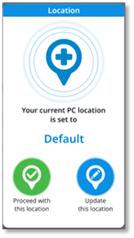


Establezca su ubicación
Dependiendo de las opciones habilitadas en la configuración, aparece una ventana emergente cuando se inicia la aplicación y/o cambia su red, la cual solicita la ubicación actual de su PC: Predeterminado, Domicilio, Otro.
|
Se muestra su ubicación actual. |
|
|
|
Acciones disponibles: |
||
|
|
Continuar con esta ubicación Enviar la ubicación actual al servidor VNA y cerrar la ventana emergente. |
|
|
|
Actualizar esta ubicación Abrir la ventana emergente de ubicación para seleccionar, crear o modificar la nueva ubicación. |
|


Impostare la propria posizione
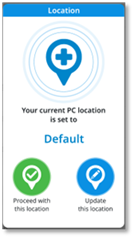
A seconda delle opzioni abilitate nelle impostazioni, viene visualizzato un pop-up quando si avvia l'applicazione e/o la rete cambia, richiedendo la posizione attuale del PC: Default, Domicilio, Altro.
|
Viene visualizzata la posizione attuale. |
|
|
|
Azioni disponibili: |
||
|
|
Continua con questa posizione Inviare la posizione attuale al server VNA e chiudere il pop-up. |
|
|
|
Aggiorna questa posizione Aprire il pop-up della posizione per selezionare, creare o modificare la nuova posizione. |
|


Uw locatie instellen
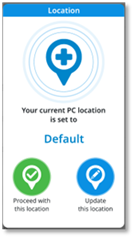
Afhankelijk van de opties die in de instellingen zijn geactiveerd, verschijnt bij het starten van de toepassing en/of netwerkwijzigingen een pop-up waarin wordt gevraagd naar de locatie van uw huidige pc: Standaard, Thuis, Andere.
|
Uw huidige locatie wordt weergegeven. |
|
|
|
Beschikbare handelingen: |
||
|
|
Doorgaan met deze locatie De huidige locatie naar de VNA-server sturen en het pop-upvenster sluiten. |
|
|
|
Deze locatie updaten De locatiepop-up openen om de nieuwe locatie te selecteren, aan te maken of te wijzigen. |
|


Defina a sua localização
Dependendo das opções ativadas nas definições, é apresentada uma janela pop-up quando inicia a aplicação e/ou a sua rede muda, solicitando a sua localização do PC atual: Predefinido, Casa, Outro.
|
A sua localização atual é exibida. |
|
|
|
Ações disponíveis: |
||
|
|
Prosseguir com esta localização Enviar a localização atual para o servidor VNA e fechar a janela pop-up. |
|
|
|
Atualizar esta localização Abrir a janela pop-up de localização para selecionar, criar ou modificar a nova localização. |
|