Contacts
|
|
If possible, use the user local menu displayed on the current page (ALE-500, ALE-400) or open it using the user local menu button. |

|
|
|
|
|
|
|
|
|
|
|
|



|
|
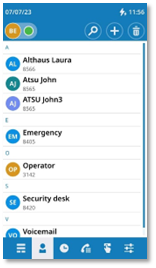
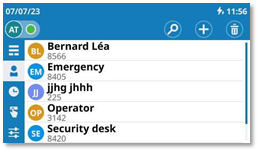
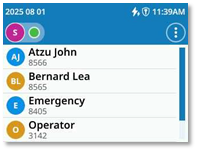
Open the user local menu: Contacts. |
||
|
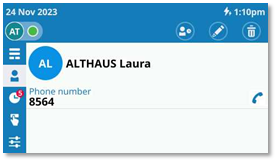
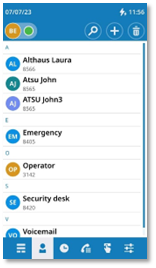
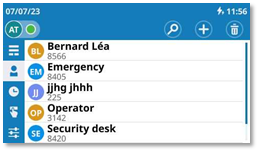
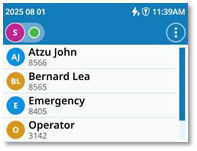
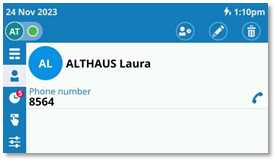
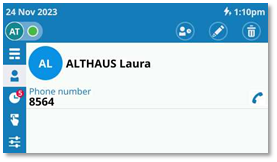
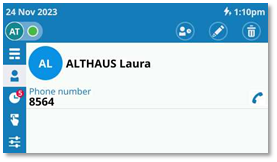
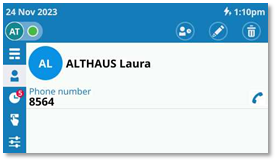
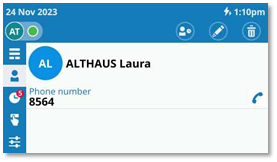
Display your personal directory: all saved contacts are displayed alphabetically. |
|||
|
Available actions: |
|||
|
|
Call the selected contact. The number used is the number displayed under the name. |
||
|
|
Open the contact card by selecting the avatar (left side). |
||
|
|
Scroll the page to display the rest of the list (touch screen or navigation keys). |
||
|
|
Use Smart Pad to scroll through the page and select a contact (highlighted). Call the selected contact. The number used is the number displayed under the name. |
||
|
|
Open the context menu to access the following actions (ALE-300 only). |
|
|
|
|
New contact |
||
|
|
Search Search for a contact. |
||
|
|
Modify |
||
|
|
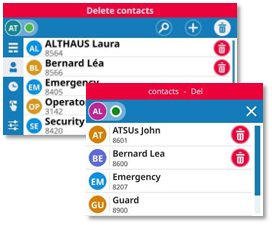
Delete a contact. This
icon is red for ALE-300: |
||


Contact card
|
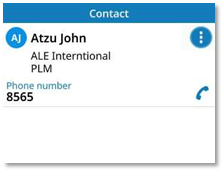
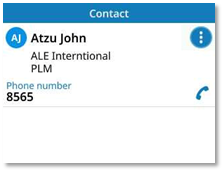
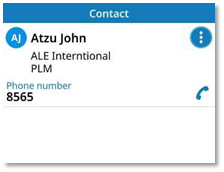
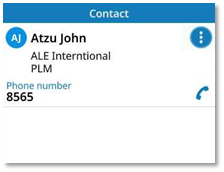
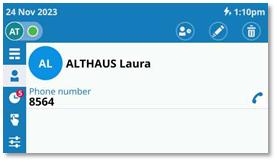
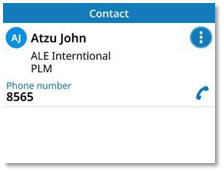
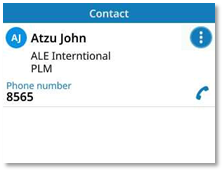
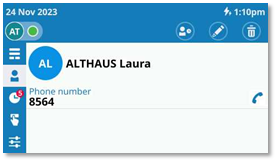
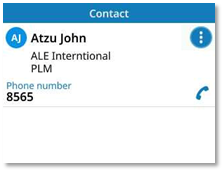
Open the contact card by selecting the avatar (left side). |
|
||
|
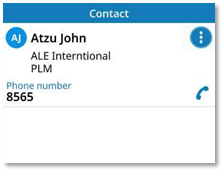
Information available about your contact is displayed in the page. The information displayed depends on the fields entered in the form (business phone, mobile, extension number, email, address, etc.). |
|
||
|
Available actions: |
|||
|
|
Place an audio call. |
||
|
|
Open the context menu to access the following actions (ALE-300 only). |
|
|
|
|
Edit the contact card. |
||
|
|
Delete contact. This
icon is red for ALE-300: |
||
|
|
Display the call log with this contact (incoming calls, outgoing calls, hunting group calls (optional), missed calls, time, numbers, and duration). See chapter: open the call log details. |
||



Create a new contact
|
|
Open the user local menu: Contacts. |
|||
|
|
ALE-300 only |
|
Open context menu. |
|
|
·
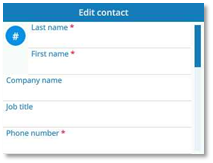
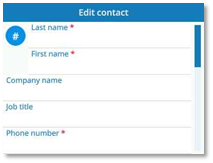
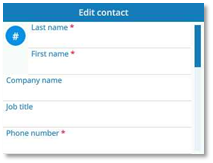
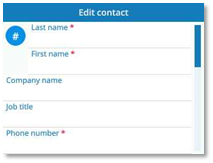
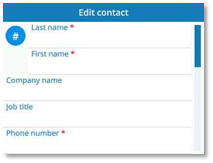
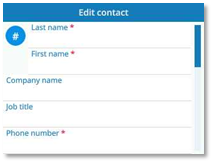
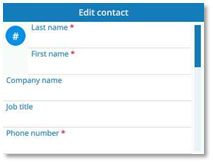
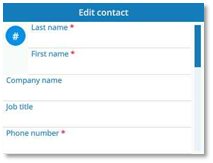
· Add information about your contact. In mandatory fields, a red asterisk (*) is shown to indicate required information (at least a name and number). Depending on your desk phone model, tap the field directly or use the softkey to the right or left of the field to edit it. You can also use the up and down navigation keys. ·
|
|
|||
|
Use one of the following: ·
·
o
o
|
||||




Create a new contact from your call logs
|
|
Open the user local menu: Call log. |
|
·
·
·
·
|
|
|
Use one of the following: ·
·
o
o
|
|


Create a new contact from search results
|
·
·
·
·
|
|
Use one of the following: ·
·
o
o
|


If the contact is already in your local directory, the contact card will be edited.
 : The OK key allows you to exit edit mode and save without confirmation.
Modify a contact
|
|
Open the user local menu: Contacts. |
|
|
· Use one of the following: o
o
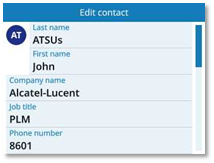
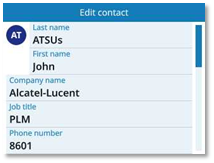
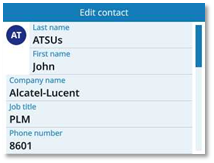
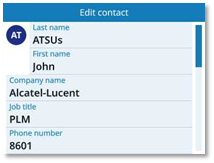
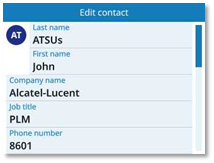
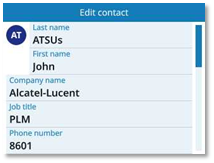
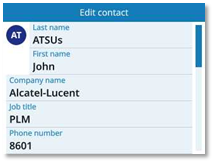
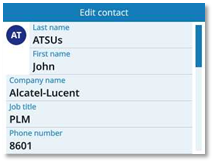
· Modify the contact card. ·
|
|
|
|
Use one of the following: ·
·
o
o
|
||




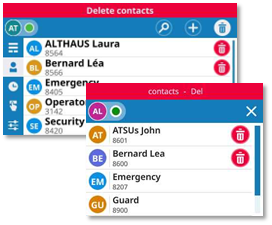
Delete a contact
|
|
Open the user local menu: Contacts. |
|
|
·
·
·
·
|
|
|


Contacts
|
|
Si possible, utiliser le menu local de l'utilisateur affiché sur la page en cours (ALE-500, ALE-400) ou l'ouvrir à l'aide de la touche du menu local de l'utilisateur. |

|
|
|
|
|
|
|
|
|
|
|
|



|
|
Ouvrir le menu local de l'utilisateur : Contacts. |
||
|
Afficher votre annuaire personnel : tous les contacts enregistrés sont affichés par ordre alphabétique. |
|||
|
Actions disponibles : |
|||
|
|
Appeler le contact sélectionné. Le numéro utilisé est le numéro affiché sous le nom. |
||
|
|
Ouvrir la fiche contact en sélectionnant l'avatar (côté gauche). |
||
|
|
Faites défiler la page pour afficher le reste de la liste (écran tactile ou touches de navigation). |
||
|
|
Utiliser le Smart Pad pour faire défiler la page et sélectionner un contact (mis en surbrillance). Appeler le contact sélectionné. Le numéro utilisé est le numéro affiché sous le nom. |
||
|
|
Ouvrir le menu contextuel pour accéder aux actions suivantes (ALE-300 uniquement). |
|
|
|
|
Nouveau contact |
||
|
|
Recherche Chercher un contact. |
||
|
|
Modifier |
||
|
|
Supprimer
un contact. Cette icône est rouge pour
l'ALE-300 : |
||


Fiche de contact
|
Ouvrir la fiche contact en sélectionnant l'avatar (côté gauche). |
|
||
|
Les informations disponibles sur votre contact sont affichées dans la page. Les informations affichées dépendent des champs saisis dans le formulaire (téléphone professionnel, portable, numéro de poste, courriel, adresse, etc.). |
|
||
|
Actions disponibles : |
|||
|
|
Passer un appel audio. |
||
|
|
Ouvrir le menu contextuel pour accéder aux actions suivantes (ALE-300 uniquement). |
|
|
|
|
Modifier la carte du contact. |
||
|
|
Supprimer
un contact. Cette icône est rouge pour
l'ALE-300 : |
||
|
|
Afficher le journal des appels de ce contact (appels entrants, appels sortants, appels du groupement de postes (facultatif), appels manqués, heure, numéros et durée). Voir chapitre : ouvrir les détails du journal d'appels. |
||



Créer un contact
|
|
Ouvrir le menu local de l'utilisateur : Contacts. |
|||
|
|
ALE-300 uniquement |
|
Ouvrir le menu contextuel. |
|
|
·
· Ajouter des informations sur votre contact. Dans les champs obligatoires, un astérisque rouge (*) est affiché pour indiquer les informations obligatoires (au moins un nom et un numéro). Selon le modèle de votre téléphone de bureau, appuyer directement sur le champ ou utilisez la touche de fonction à droite ou à gauche du champ pour le modifier. Vous pouvez également utiliser les touches de navigation vers le haut et vers le bas. ·
|
|
|||
|
Utilisez l'une des options suivantes : ·
·
o
o
|
||||




Créer un nouveau contact à partir de vos journaux d'appels
|
|
Ouvrir le menu local de l'utilisateur : Journal d'appels. |
|
·
·
·
·
|
|
|
Utilisez l'une des options suivantes : ·
·
o
o
|
|


Créer un nouveau contact à partir des résultats de la recherche
|
·
·
·
·
|
|
Utilisez l'une des options suivantes : ·
·
o
o
|


Si le contact figure déjà dans votre annuaire local, la fiche de contact sera modifiée.
 :
La touche OK vous permet de quitter le mode édition et d'enregistrer sans
confirmer.
:
La touche OK vous permet de quitter le mode édition et d'enregistrer sans
confirmer.
Modifier un contact
|
|
Ouvrir le menu local de l'utilisateur : Contacts. |
|
|
· Utilisez l'une des options suivantes : o
o
· Modifier la carte du contact. ·
|
|
|
|
Utilisez l'une des options suivantes : ·
·
o
o
|
||


Supprimer un contact
|
|
Ouvrir le menu local de l'utilisateur : Contacts. |
|
|
·
·
·
·
|
|
|


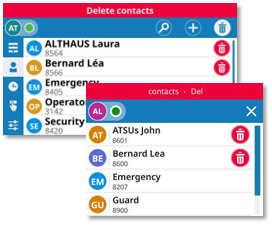
Kontakte
|
|
Wenn möglich, verwenden Sie das lokale Benutzermenü, das auf der aktuellen Seite angezeigt wird (ALE-500, ALE-400), oder öffnen Sie es über die Schaltfläche für das lokale Benutzermenü. |

|
|
|
|
|
|
|
|
|
|
|
|

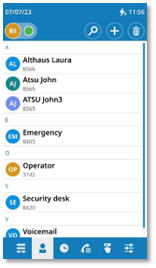
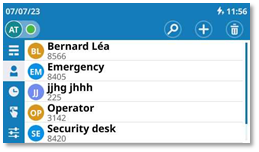
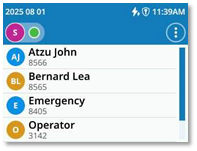


|
|
Das lokale Benutzermenü öffnen: Kontakte. |
||
|
Ihr persönliches Verzeichnis anzeigen: alle gespeicherten Kontakte werden alphabetisch angezeigt. |
|||
|
Verfügbare Aktionen: |
|||
|
|
Den ausgewählten Kontakt anrufen. Es wird die Nummer verwendet, die unter dem Namen angezeigt wird. |
||
|
|
Die Kontaktkarte durch Auswahl des Avatars öffnen (linke Seite). |
||
|
|
Auf der Seite scrollen, um den Rest der Liste anzuzeigen (Touchscreen oder Navigationstasten). |
||
|
|
Mit dem Smart Pad durch die Seite blättern und einen Kontakt auswählen (hervorgehoben). Den ausgewählten Kontakt anrufen. Es wird die Nummer verwendet, die unter dem Namen angezeigt wird. |
||
|
|
Öffnen Sie das Kontextmenü, um auf die folgenden Aktionen zuzugreifen (Nur ALE-300). |
|
|
|
|
Neuer Kontakt |
||
|
|
Suchen Kontakt suchen. |
||
|
|
Ändern |
||
|
|
Kontakt löschen. Dieses
Symbol ist rot bei ALE-300: |
||


Kontaktkarte
|
Die Kontaktkarte durch Auswahl des Avatars öffnen (linke Seite). |
|
||
|
Die verfügbaren Informationen über Ihren Kontakt werden auf der Seite angezeigt. Die angezeigten Informationen hängen von den im Formular eingegebenen Feldern ab (Telefon geschäftlich, Handy, Durchwahl, E-Mail, Adresse usw.). |
|
||
|
Verfügbare Aktionen: |
|||
|
|
Einen Audioanruf tätigen. |
||
|
|
Öffnen Sie das Kontextmenü, um auf die folgenden Aktionen zuzugreifen (Nur ALE-300). |
|
|
|
|
Bearbeiten Sie die Kontaktkarte. |
||
|
|
Kontakt löschen. Dieses
Symbol ist rot bei ALE-300: |
||
|
|
Zeigen Sie das Anrufprotokoll mit diesem Kontakt an (eingehende Anrufe, ausgehende Anrufe, Anrufe der Sammelanschlussgruppe (optional), verpasste Anrufe, Uhrzeit, Nummern und Dauer). Siehe Kapitel: Anrufprotokoll einsehen. |
||



Neuen Kontakt erstellen
|
|
Das lokale Benutzermenü öffnen: Kontakte. |
|||
|
|
Nur ALE-300 |
|
Öffnen Sie das Kontextmenü. |
|
|
·
· Informationen über Ihren Kontakt hinzufügen. In Pflichtfeldern wird ein rotes Sternchen (*) angezeigt, um auf erforderliche Angaben hinzuweisen (mindestens Name und Nummer). Tippen Sie je nach Modell Ihres Tischtelefons direkt auf das Feld oder verwenden Sie den Softkey rechts oder links neben dem Feld, um es zu bearbeiten. Sie können auch die Navigationstasten nach oben und unten verwenden. ·
|
|
|||
|
Verwenden Sie eine der folgenden Möglichkeiten: ·
·
o
o
|
||||




Einen neuen Kontakt aus Ihren Anrufprotokollen erstellen
|
|
Das lokale Benutzermenü öffnen: Anrufliste. |
|
·
·
·
·
|
|
|
Verwenden Sie eine der folgenden Möglichkeiten: ·
·
o
o
|
|


Einen neuen Kontakt aus den Suchergebnissen erstellen
|
·
·
·
·
|
|
Verwenden Sie eine der folgenden Möglichkeiten: ·
·
o
o
|


Wenn der Kontakt bereits in Ihrem lokalen Verzeichnis enthalten ist, wird die Visitenkarte bearbeitet.
 : Mit der OK-Taste können Sie den Bearbeitungsmodus
verlassen und ohne Bestätigung speichern.
: Mit der OK-Taste können Sie den Bearbeitungsmodus
verlassen und ohne Bestätigung speichern.
Einen Kontakt ändern
|
|
Das lokale Benutzermenü öffnen: Kontakte. |
|
|
· Verwenden Sie eine der folgenden Möglichkeiten: o
o
· Ändern Sie die Kontaktkarte. ·
|
|
|
|
Verwenden Sie eine der folgenden Möglichkeiten: ·
·
o
o
|
||



Kontakt löschen
|
|
Das lokale Benutzermenü öffnen: Kontakte. |
|
|
·
·
·
·
|
|
|


Contactos
|
|
Si es posible, utilice el menú local de usuario que aparece en la página actual (ALE-500, ALE-400) o ábralo con el botón de menú local de usuario. |

|
|
|
|
|
|
|
|
|
|
|
|



|
|
Abrir el menú local de usuario: Contactos. |
||
|
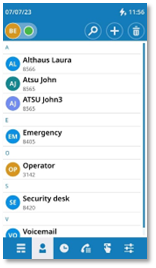
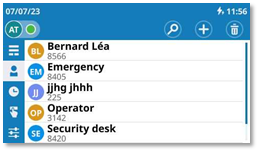
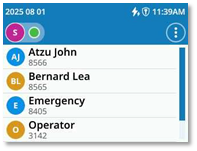
Mostrar el directorio personal: todos los contactos guardados se muestran por orden alfabético. |
|||
|
Acciones disponibles: |
|||
|
|
Llamar al contacto seleccionado. El número utilizado es el que aparece bajo el nombre. |
||
|
|
Abrir la ficha de contacto seleccionando el avatar (lado izquierdo). |
||
|
|
Desplácese por la página para ver el resto de la lista (pantalla táctil o teclas de navegación). |
||
|
|
Utilizar el Smart Pad para desplazarse por la página y seleccionar un contacto (resaltado). Llamar al contacto seleccionado. El número utilizado es el que aparece bajo el nombre. |
||
|
|
Abrir el menú contextual para acceder a las siguientes acciones (Solo en el ALE-300). |
|
|
|
|
Nuevo contacto |
||
|
|
Buscar Buscar un contacto. |
||
|
|
Modificar |
||
|
|
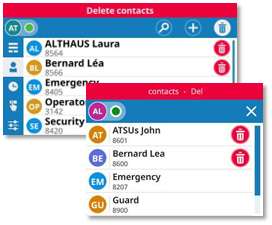
Eliminar contacto. Este
icono es rojo para ALE-300: |
||


Ficha de contacto
|
Abrir la ficha de contacto seleccionando el avatar (lado izquierdo). |
|
||
|
La información disponible sobre el contacto se muestra en la página. La información mostrada depende de los campos rellenados en el formulario (teléfono de empresa, móvil, número de extensión, correo electrónico, dirección, etc.). |
|
||
|
Acciones disponibles: |
|||
|
|
Realizar una llamada de audio. |
||
|
|
Abrir el menú contextual para acceder a las siguientes acciones (Solo en el ALE-300). |
|
|
|
|
Editar la tarjeta de contacto. |
||
|
|
Eliminar contacto. Este
icono es rojo para ALE-300: |
||
|
|
Mostrar el registro de llamadas con este contacto (llamadas entrantes, llamadas salientes, llamadas de teléfonos agrupados (opcionales), llamadas perdidas, hora, números y duración). Consulte el capítulo: abrir los detalles del registro. |
||



Crear un nuevo contacto
|
|
Abrir el menú local de usuario: Contactos. |
|||
|
|
Solo en el ALE-300 |
|
Abrir menú contextual. |
|
|
·
· Añadir información sobre el contacto. En los campos obligatorios, aparece un asterisco rojo (*) para indicar la información requerida (al menos un nombre y un número). Según el modelo de su teléfono de escritorio, pulse el campo directamente o utilice la tecla dinámica a la derecha o a la izquierda del campo para editarlo. También puede utilizar las teclas de navegación arriba y abajo. ·
|
|
|||
|
Utilizar uno de los siguientes: ·
·
o
o
|
||||




Crear un nuevo contacto a partir de sus registros de llamadas
|
|
Abrir el menú local de usuario: Registro de llamadas. |
|
·
·
·
·
|
|
|
Utilizar uno de los siguientes: ·
·
o
o
|
|


Crear un nuevo contacto a partir de los resultados de la búsqueda
|
·
·
·
·
|
|
Utilizar uno de los siguientes: ·
·
o
o
|


Si el contacto ya está en su directorio local, se editará la ficha de contacto.
 :
La tecla OK permite salir del modo de edición y guardar sin confirmación.
:
La tecla OK permite salir del modo de edición y guardar sin confirmación.
Modificar un contacto
|
|
Abrir el menú local de usuario: Contactos. |
|
|
· Utilizar uno de los siguientes: o
o
· Modificar la tarjeta de contacto. ·
|
|
|
|
Utilizar uno de los siguientes: ·
·
o
o
|
||



Eliminar contacto
|
|
Abrir el menú local de usuario: Contactos. |
|
|
·
·
·
·
|
|
|


Contatti
|
|
Se possibile, utilizzare il menu locale utente visualizzato nella pagina corrente (ALE-500, ALE-400) o aprirlo utilizzando il pulsante del menu locale utente. |

|
|
|
|
|
|
|
|
|
|
|
|



|
|
Aprire il menu locale dell'utente: Contatti. |
||
|
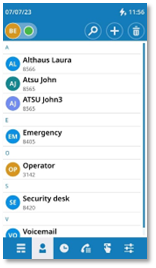
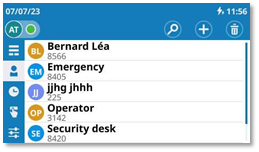
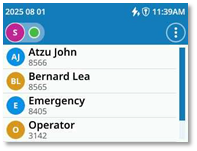
Visualizzare l'elenco personale: tutti i contatti salvati sono visualizzati in ordine alfabetico. |
|||
|
Azioni disponibili: |
|||
|
|
Chiamare il contatto selezionato. Il numero utilizzato è quello visualizzato sotto il nome. |
||
|
|
Aprire la scheda del contatto selezionando l'avatar (a sinistra). |
||
|
|
Scorrere la pagina per visualizzare il resto dell'elenco (schermo touch o tasti di navigazione). |
||
|
|
Utilizzare lo Smart Pad per scorrere la pagina e selezionare un contatto (caratteristiche di rilievo). Chiamare il contatto selezionato. Il numero utilizzato è quello visualizzato sotto il nome. |
||
|
|
Aprire il menu contestuale per accedere alle seguenti azioni (solo ALE-300). |
|
|
|
|
Nuovo contatto |
||
|
|
Cerca Cercare un contatto. |
||
|
|
Modifica |
||
|
|
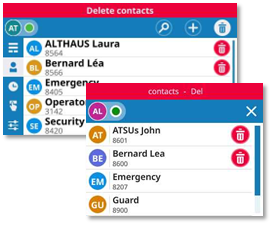
Eliminare un contatto.
Questa icona è rossa per ALE-300: |
||


Scheda contatto
|
Aprire la scheda del contatto selezionando l'avatar (a sinistra). |
|
||
|
Le informazioni disponibili sul contatto sono visualizzate nella pagina. Le informazioni visualizzate dipendono dai campi inseriti nel modulo (telefono aziendale, cellulare, numero interno, e-mail, indirizzo, ecc.). |
|
||
|
Azioni disponibili: |
|||
|
|
Effettuare una chiamata audio. |
||
|
|
Aprire il menu contestuale per accedere alle seguenti azioni (solo ALE-300). |
|
|
|
|
Modificare la scheda di contatto. |
||
|
|
Eliminare contatto. Questa
icona è rossa per ALE-300: |
||
|
|
Visualizzare il registro chiamate con questo contatto (chiamate in entrata, chiamate in uscita, chiamate di gruppo di ricerca (opzionale), chiamate perse, tempo, numeri, durata). Vedere il capitolo: aprire i dettagli del registro. |
||



Creare un nuovo contatto
|
|
Aprire il menu locale dell'utente: Contatti. |
|||
|
|
Solo ALE-300 |
|
Aprire il menu contestuale. |
|
|
·
· Aggiungere informazioni sul tuo contatto. Nei campi obbligatori viene visualizzato un asterisco rosso (*) per indicare le informazioni richieste (almeno un nome e un numero). A seconda del modello di telefono fisso, toccare direttamente il campo o utilizzare il tasto softkey a destra o a sinistra del campo per modificarlo. È anche possibile utilizzare i tasti di navigazione su e giù. ·
|
|
|||
|
Utilizzare uno tra i seguenti: ·
·
o
o
|
||||




Creare un nuovo contatto dal registro chiamate
|
|
Aprire il menu locale dell'utente: Storico delle chiamate. |
|
·
·
·
·
|
|
|
Utilizzare uno tra i seguenti: ·
·
o
o
|
|


Creare un nuovo contatto dai risultati della ricerca
|
·
·
·
·
|
|
Utilizzare uno tra i seguenti: ·
·
o
o
|


Se il contatto è già presente nella rubrica locale, la scheda di contatto verrà modificata.
 :
Il tasto OK consente di uscire dalla modalità di modifica e di salvare senza
conferma.
:
Il tasto OK consente di uscire dalla modalità di modifica e di salvare senza
conferma.
Modificare un contatto
|
|
Aprire il menu locale dell'utente: Contatti. |
|
|
· Utilizzare uno tra i seguenti: o
o
· Modificare la scheda di contatto. ·
|
|
|
|
Utilizzare uno tra i seguenti: ·
·
o
o
|
||




Eliminare un contatto
|
|
Aprire il menu locale dell'utente: Contatti. |
|
|
·
·
·
·
|
|
|


Contactos
|
|
Se possível, utilizar o menu local do utilizador apresentado na página atual (ALE-500, ALE-400) ou abri-lo utilizando o botão do menu local do utilizador. |

|
|
|
|
|
|
|
|
|
|
|
|



|
|
Abrir o menu local do utilizador: Contactos. |
||
|
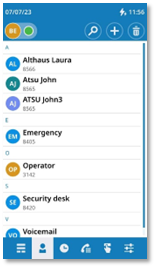
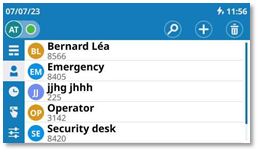
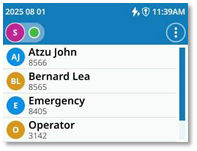
Apresentar o diretório pessoal: todos os contactos guardados são apresentados por ordem alfabética. |
|||
|
Ações disponíveis: |
|||
|
|
Ligar para o contacto selecionado. O número utilizado é o número apresentado sob o nome. |
||
|
|
Abra o cartão de contacto selecionando o avatar (lado esquerdo). |
||
|
|
Percorrer a página para exibir o resto da lista (ecrã tátil ou teclas de navegação). |
||
|
|
Utilizar o Smart Pad para percorrer a página e selecionar um contacto (realçado). Ligar para o contacto selecionado. O número utilizado é o número apresentado sob o nome. |
||
|
|
Abrir o menu de contexto para aceder às seguintes ações (apenas ALE-300). |
|
|
|
|
Novo contacto |
||
|
|
Procurar Procurar um contacto. |
||
|
|
Modificar |
||
|
|
Eliminar um contacto. Este
ícone é vermelho para o ALE-300: |
||


Cartão de contacto
|
Abra o cartão de contacto selecionando o avatar (lado esquerdo). |
|
||
|
As informações disponíveis sobre o contacto são apresentadas na página. A informação apresentada depende dos campos introduzidos no formulário (telefone de empresa, telemóvel, número de extensão, e-mail, morada, etc.). |
|
||
|
Ações disponíveis: |
|||
|
|
Efetuar uma chamada de áudio. |
||
|
|
Abrir o menu de contexto para aceder às seguintes ações (apenas ALE-300). |
|
|
|
|
Editar o cartão de contacto. |
||
|
|
Eliminar contacto. Este
ícone é vermelho para o ALE-300: |
||
|
|
Apresentar o registo de chamadas com este contacto (chamadas recebidas, chamadas efetuadas, chamadas para grupos de telefones (opcional), chamadas perdidas, hora, números e duração). Consulte o capítulo: abrir os detalhes do registo. |
||



Criar um novo contacto
|
|
Abrir o menu local do utilizador: Contactos. |
|||
|
|
Apenas ALE-300 |
|
Abrir o menu de contexto. |
|
|
·
· Adicionar informações sobre o contacto. Nos campos obrigatórios, é apresentado um asterisco (*) vermelho para indicar as informações necessárias (pelo menos um nome e um número). Dependendo do modelo do seu telefone de secretária, tocar diretamente no campo ou utilizar a tecla de função à direita ou à esquerda do campo para o editar. Também pode utilizar as teclas de navegação para cima e para baixo. ·
|
|
|||
|
Utilize um(a) do(a)s seguintes: ·
·
o
o
|
||||




Criar um novo contacto a partir do seu registo de chamadas
|
|
Abrir o menu local do utilizador: Registo de chamadas. |
|
·
·
·
·
|
|
|
Utilize um(a) do(a)s seguintes: ·
·
o
o
|
|


Criar um novo contacto a partir dos resultados de pesquisa
|
·
·
·
·
|
|
Utilize um(a) do(a)s seguintes: ·
·
o
o
|


Se o contacto já estiver no seu diretório local, o cartão de contacto será editado.
 : A tecla OK permite-lhe sair do modo de edição e guardar
sem confirmação.
: A tecla OK permite-lhe sair do modo de edição e guardar
sem confirmação.
Modificar um contacto
|
|
Abrir o menu local do utilizador: Contactos. |
|
|
· Utilize um(a) do(a)s seguintes: o
o
· Modificar o cartão de contacto. ·
|
|
|
|
Utilize um(a) do(a)s seguintes: ·
·
o
o
|
||




Eliminar um contacto
|
|
Abrir o menu local do utilizador: Contactos. |
|
|
·
·
·
·
|
|
|


Kişiler
|
|
Mümkünse geçerli sayfada (ALE-500, ALE-400) görüntülenen kullanıcı yerel menüsünü kullanın veya kullanıcı yerel menüsü düğmesini kullanarak menüyü açın. |

|
|
|
|
|
|
|
|
|
|
|
|



|
|
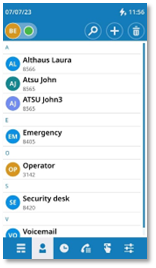
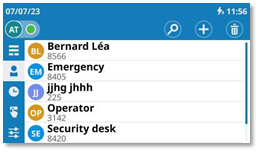
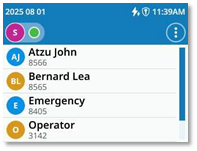
Kullanıcı yerel menüsünü açın: Kişiler. |
||
|
Kişisel rehberinizi görüntüleyin: kayıtlı tüm kişiler alfabetik olarak gösterilir. |
|||
|
Mevcut eylemler: |
|||
|
|
Seçili kişiyi arayın. Kullanılan numara adın altında görünen numaradır. |
||
|
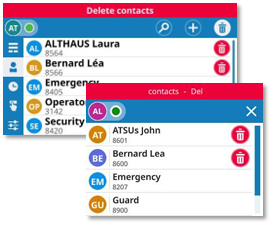
|
Avatarı seçerek kişi kartını açın (sol taraf). |
||
|
|
Listenin kalanını görmek için sayfayı kaydırın (dokunmatik ekran veya gezinme tuşları). |
||
|
|
Sayfada gezinmek ve kişi seçmek için Smart Pad'i kullanın (vurgulanmış). Seçili kişiyi arayın. Kullanılan numara adın altında görünen numaradır. |
||
|
|
Aşağıdaki işlemlere erişmek için içerik menüsünü açın (Yalnızca ALE-300). |
|
|
|
|
Yeni kişi |
||
|
|
Ara Bir kişiyi arayın. |
||
|
|
Değiştir |
||
|
|
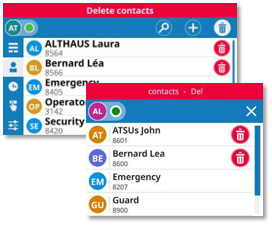
Bir kişiyi silin. ALE-300
için bu simge kırmızıdır: |
||


Kişi kartı
|
Avatarı seçerek kişi kartını açın (sol taraf). |
|
||
|
Kişinizle ilgili mevcut bilgiler sayfada görüntülenir. Görüntülenen bilgiler forma girilen alanlara bağlıdır (iş telefonu, cep telefonu, dahili numara, e-posta, adres vb.). |
|
||
|
Mevcut eylemler: |
|||
|
|
Sesli arama yapın. |
||
|
|
Aşağıdaki işlemlere erişmek için içerik menüsünü açın (Yalnızca ALE-300). |
|
|
|
|
Kişi kartını düzenleyin. |
||
|
|
Bir kişiyi silin. ALE-300
için bu simge kırmızıdır: |
||
|
|
Bu kişiyle olan arama kaydını görüntüleyin (gelen aramalar, giden aramalar, grup aramaları (isteğe bağlı), cevaplanmamış aramalar, saat, numaralar ve süre). Bkz. bölüm: günlük ayrıntılarını görüntüleyin. |
||



Yeni bir kişi oluşturun
|
|
Kullanıcı yerel menüsünü açın: Kişiler. |
|||
|
|
Yalnızca ALE-300 |
|
Bağlam menüsünü açın. |
|
|
·
· Kişiniz hakkında bilgi ekleyin. Zorunlu alanlarda, gerekli bilgileri (en azından bir isim ve numara) belirtmek için kırmızı bir yıldız işareti (*) bulunur. Masa telefonu modelinize bağlı olarak, alana doğrudan dokunun veya düzenlemek için alanın sağındaki veya solundaki yazılım tuşunu kullanın. Yukarı ve aşağı gezinme tuşlarını da kullanabilirsiniz. ·
|
|
|||
|
Aşağıdakilerden birini kullanın: ·
·
o
o
|
||||




Arama kayıtlarınızdan yeni bir kişi oluşturun
|
|
Kullanıcı yerel menüsünü açın: Arama kaydı. |
|
·
·
·
·
|
|
|
Aşağıdakilerden birini kullanın: ·
·
o
o
|
|


Arama sonuçlarından yeni bir kişi oluşturun
|
·
·
·
·
|
|
Aşağıdakilerden birini kullanın: ·
·
o
o
|


Kişi zaten yerel rehberinizde bulunuyorsa kişi kartı düzenlenecektir.
 : Düzenleme modundan çıkmak ve onaylamadan kaydetmek için
Tamam tuşunu kullanın.
: Düzenleme modundan çıkmak ve onaylamadan kaydetmek için
Tamam tuşunu kullanın.
Kişi kaydını değiştir
|
|
Kullanıcı yerel menüsünü açın: Kişiler. |
|
|
· Aşağıdakilerden birini kullanın: o
o
· Kişi kartını değiştirin. ·
|
|
|
|
Aşağıdakilerden birini kullanın: ·
·
o
o
|
||




Bir kişiyi silin
|
|
Kullanıcı yerel menüsünü açın: Kişiler. |
|
|
·
·
·
·
|
|
|


联系人
|
|
如果可能,请使用当前页面(ALE-500、ALE-400)上显示的用户本地菜单或使用用户本地菜单按钮将其打开。 |

|
|
|
|
|
|
|
|
|
|
|
|



|
|
打开用户本地菜单: 联系人。 |
||
|
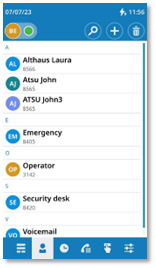
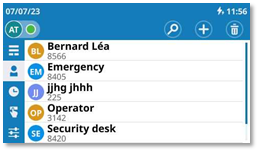
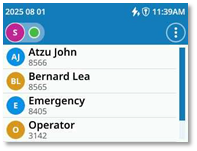
显示您的个人电话簿:所有已保存的联系人均按字母顺序显示。 |
|||
|
可用操作: |
|||
|
|
呼叫所选联系人。 使用的号码是姓名下方显示的号码。 |
||
|
|
通过选择头像打开联系人卡片(左侧)。 |
||
|
|
滚动页面以显示列表的其余部分(触摸屏或导航键)。 |
||
|
|
使用 Smart Pad 滚动浏览页面并选择联系人 (已突出显示)。 呼叫所选联系人。 使用的号码是姓名下方显示的号码。 |
||
|
|
打开上下文菜单即可访问以下操作 (仅 ALE-300)。 |
|
|
|
|
新建联系人 |
||
|
|
搜索 搜索联系人。 |
||
|
|
修改 |
||
|
|
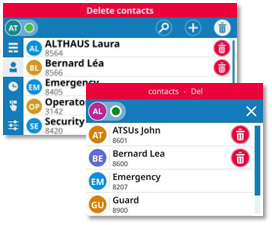
删除联系人。 ALE-300 的此图标为红色: |
||


名片
|
通过选择头像打开联系人卡片(左侧)。 |
|
||
|
页面中显示有关联系人的可用信息。 显示的信息取决于表格中输入的字段 (办公电话、手机、分机号码、电子邮件、地址等)。 |
|
||
|
可用操作: |
|||
|
|
拨打语音呼叫。 |
||
|
|
打开上下文菜单即可访问以下操作 (仅 ALE-300)。 |
|
|
|
|
编辑联系人名片。 |
||
|
|
删除联系人。 ALE-300 的此图标为红色: |
||
|
|
显示此联系人的通话记录 (来电、去电、寻线组呼叫(可选)、未接来电、时间、号码以及持续时间)。 参见用户手册中的章节: 显示记录详情。 |
||



创建新联系人
|
|
打开用户本地菜单: 联系人。 |
|||
|
|
仅 ALE-300 |
|
打开上下文菜单。 |
|
|
·
· 添加您的联系人的信息。 在必填字段中,必填信息以红色星号 (*) 表示(至少是姓名和号码)。 根据您的桌面话机型号,直接点击字段或使用字段左右两侧的软键进行编辑。 您也可以使用向上和向下导航键。 ·
|
|
|||
|
使用其中以下一项功能: ·
·
o
o
|
||||




从通话记录中创建新联系人
|
|
打开用户本地菜单: 呼叫日志。 |
|
·
·
·
·
|
|
|
使用其中以下一项功能: ·
·
o
o
|
|


根据搜索结果创建新联系人
|
·
·
·
·
|
|
使用其中以下一项功能: ·
·
o
o
|


如果联系人已在您的本地电话簿中,则将编辑联系人名片。
 : 您可使用 OK 键退出编辑模式并在不确认的情况下保存更改。
修改联系人
|
|
打开用户本地菜单: 联系人。 |
|
|
· 使用其中以下一项功能: o
o
· 修改联系人名片。 ·
|
|
|
|
使用其中以下一项功能: ·
·
o
o
|
||




删除联系人
|
|
打开用户本地菜单: 联系人。 |
|
|
·
·
·
·
|
|
|