
Manage the lock feature
To increase your security and privacy, the Lock feature restricts access to the desk phone's interface. A PIN code is requested to unlock the desk phone.
Enable the lock feature
|
( |
|||
|
|
|||
|
1 |
|
Access the local user menu. With the ALE-500 and ALE-400, the dashboard lets you access directly to the local menu. |
|
|
2 |
|
Settings |
|
|
3 |
|
User Open user settings. The user settings are displayed by default. |
|
|
4 |
|
Device à Lock |
|
|
5 |
|
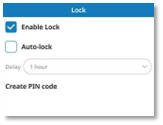
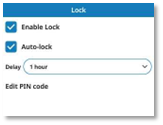
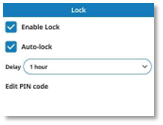
Activate or deactivate the feature: |
|
|
|
|
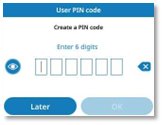
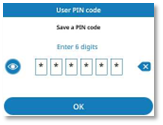
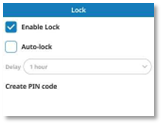
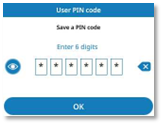
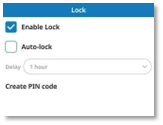
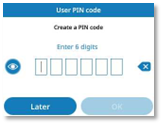
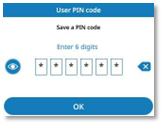
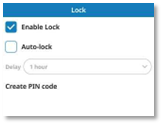
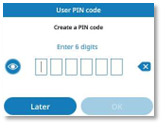
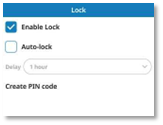
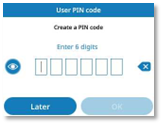
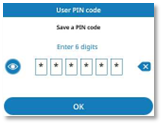
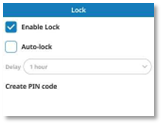
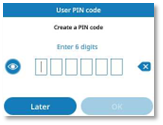
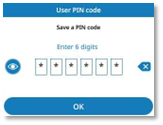
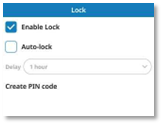
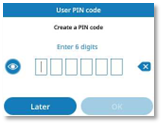
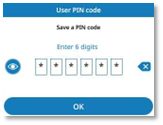
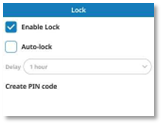
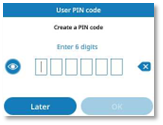
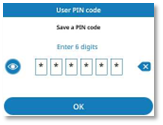
Create PIN code This PIN code will be requested to unlock the desk phone. ·
Enter
and confirm the new PIN code. ·
|
|
|
6 |
|
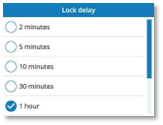
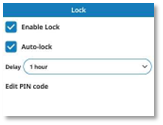
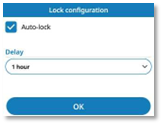
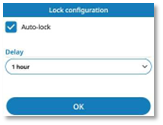
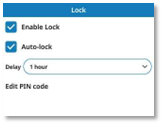
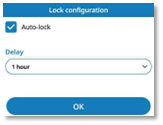
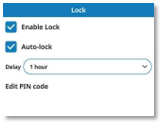
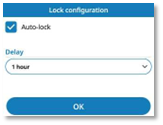
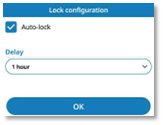
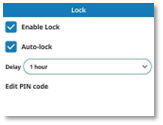
Auto-lock (optional) You can enable the option for auto-locking the desk phone after a defined period of inactivity. ·
Enable or disable the
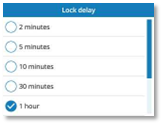
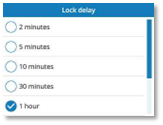
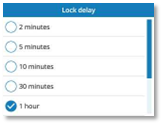
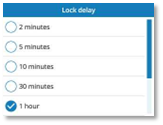
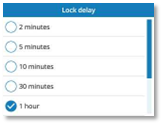
option: · Delay: if the auto-lock option is enabled, define the delay after which the desk phone will automatically lock when inactive (2 minutes, 5 minutes, 10 minutes, 30 minutes, 1 hour, 2 hours, 4 hours or 8 hours). ·
|
|
|
7 |
|
Save the changes without confirming and go back to the previous page. |
|
|
or |
|
Use one of the following: ·
·
|
|


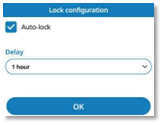


Auto-lock: you can always enable the auto-lock feature
later by enabling the option on this settings page:
( ) à
) à  Settings à Device à Lock
Modify the PIN code
|
( |
|||
|
|
|||
|
1 |
|
Access the local user menu. With the ALE-500 and ALE-400, the dashboard lets you access directly to the local menu. |
|
|
2 |
|
Settings |
|
|
3 |
|
User Open user settings. The user settings are displayed by default. |
|
|
4 |
|
Device à Lock |
|
|
5 |
|
Edit PIN code ·
Enter the current PIN code ·
Enter
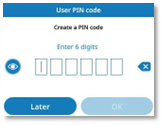
and confirm the new PIN code. |
|

 /
/ : Select these icons to show or hide the PIN code.
Later: press this button to cancel the PIN code modification.
Enable/disable the auto-lock feature
You can enable or disable the option for auto-locking the desk phone after a defined period of inactivity.
|
( |
|||
|
|
|||
|
1 |
|
Access the local user menu. With the ALE-500 and ALE-400, the dashboard lets you access directly to the local menu. |
|
|
2 |
|
Settings |
|
|
3 |
|
User Open user settings. The user settings are displayed by default. |
|
|
4 |
|
Device à Lock |
|
|
6 |
|
Auto-lock (optional) ·
Enable or disable the
option: · Delay: if the auto-lock option is enabled, define the delay after which the desk phone will automatically lock when inactive (2 minutes, 5 minutes, 10 minutes, 30 minutes, 1 hour, 2 hours, 4 hours or 8 hours). |
|
|
7 |
|
Save the changes without confirming and go back to the previous page. |
|
|
or |
|
Use one of the following: ·
·
|
|


Reset the PIN code
Only your administrator can reset your PIN code. Contact your administrator.
Gérer la fonction verrouillage
Pour renforcer votre sécurité et votre confidentialité, la fonction de verrouillage limite l'accès à l'interface du téléphone de bureau. Un code PIN est requis pour déverrouiller le téléphone de bureau.
Activer la fonction verrouillage
|
( |
|||
|
|
|||
|
1 |
|
Accéder au menu local de l'utilisateur. Avec l'ALE-500 et l'ALE-400, le tableau de bord vous permet d'accéder directement au menu local. |
|
|
2 |
|
Réglages |
|
|
3 |
|
Utilisateur Ouvrir les paramètres de l'utilisateur. Les paramètres utilisateur sont affichés par défaut. |
|
|
4 |
|
Appareil à Verrouillage |
|
|
5 |
|
Activer
ou désactiver le paramètre : |
|
|
|
|
Créer code PIN Ce code PIN sera requis pour déverrouiller le téléphone de bureau. ·
Saisir et
confirmer le nouveau code PIN. ·
|
|
|
6 |
|
Verouillage automatique (en option) Vous pouvez activer l'option de verrouillage automatique du téléphone de bureau après une période d'inactivité définie. ·
Activer ou désactiver l'option : · Délai : si l'option de verrouillage automatique est activée, définir le délai après lequel le téléphone de bureau se verrouille automatiquement lorsqu'il est inactif (2 minutes, 5 minutes, 10 minutes, 30 minutes, 1 heure, 2 heures, 4 heures ou 8 heures). ·
|
|
|
7 |
|
Enregistrer les modifications sans confirmer et revenir à la page précédente. |
|
|
ou |
|
Utilisez l'une des options suivantes : ·
·
|
|




Verouillage
automatique : vous pouvez toujours activer
la fonction de verrouillage automatique ultérieurement en activant l'option sur
cette page de paramètres :
( ) à
) à  Réglages à Appareil à Verrouillage
Modifier le code PIN
|
( |
|||
|
|
|||
|
1 |
|
Accéder au menu local de l'utilisateur. Avec l'ALE-500 et l'ALE-400, le tableau de bord vous permet d'accéder directement au menu local. |
|
|
2 |
|
Réglages |
|
|
3 |
|
Utilisateur Ouvrir les paramètres de l'utilisateur. Les paramètres utilisateur sont affichés par défaut. |
|
|
4 |
|
Appareil à Verrouillage |
|
|
5 |
|
Modifier code PIN ·
Saisir le code PIN actuel ·
Saisir et
confirmer le nouveau code PIN. |
|

 /
/ : Sélectionner
ces icônes pour afficher ou masquer le code PIN.
: Sélectionner
ces icônes pour afficher ou masquer le code PIN.
Ignorer : appuyer sur cette touche pour annuler la modification du code PIN.
Activer/désactiver la fonction de verrouillage automatique
Vous pouvez activer ou désactiver l'option de verrouillage automatique du téléphone de bureau après une période d'inactivité définie.
|
( |
|||
|
|
|||
|
1 |
|
Accéder au menu local de l'utilisateur. Avec l'ALE-500 et l'ALE-400, le tableau de bord vous permet d'accéder directement au menu local. |
|
|
2 |
|
Réglages |
|
|
3 |
|
Utilisateur Ouvrir les paramètres de l'utilisateur. Les paramètres utilisateur sont affichés par défaut. |
|
|
4 |
|
Appareil à Verrouillage |
|
|
6 |
|
Verouillage automatique (en option) ·
Activer ou désactiver l'option : · Délai : si l'option de verrouillage automatique est activée, définir le délai après lequel le téléphone de bureau se verrouille automatiquement lorsqu'il est inactif (2 minutes, 5 minutes, 10 minutes, 30 minutes, 1 heure, 2 heures, 4 heures ou 8 heures). |
|
|
7 |
|
Enregistrer les modifications sans confirmer et revenir à la page précédente. |
|
|
ou |
|
Utilisez l'une des options suivantes : ·
·
|
|


Réinitialiser le code PIN
Seul votre administrateur peut réinitialiser votre code PIN. Contacter votre administrateur.
Verwalten Sie die Sperrfunktion
Um Ihre Sicherheit und Privatsphäre zu erhöhen, schränkt die Sperrfunktion den Zugriff auf die Schnittstelle des Tischtelefons ein. Ein PIN-Code ist zum Entsperren des Telefons erforderlich.
Sperrfunktion aktivieren
|
( |
|||
|
|
|||
|
1 |
|
Auf das lokale Benutzermenü zugreifen. Beim ALE-500 und ALE-400 bietet das Dashboard Ihnen direkten Zugriff auf das lokale Menü. |
|
|
2 |
|
Einstellungen |
|
|
3 |
|
Benutzer Benutzereinstellungen öffnen. Die Benutzereinstellungen werden standardmäßig angezeigt. |
|
|
4 |
|
Gerät à Sperren |
|
|
5 |
|
Aktivieren oder deaktivieren Sie die Funktion: |
|
|
|
|
PIN-Code erstellen Dieser PIN-Code wird zum Entsperren des Tischtelefons abgefragt. ·
Geben
Sie den PIN-Code ein und bestätigen Sie ihn. ·
|
|
|
6 |
|
Automatische Sperre (optional) Sie können die Option aktivieren, das Telefon nach einer bestimmten Zeit der Inaktivität automatisch zu sperren. ·
Die Option aktivieren oder
deaktivieren: · Verzögerung: wenn die automatische Sperroption aktiviert ist, legen Sie die Verzögerung fest, nach der das Tischtelefon bei Inaktivität automatisch gesperrt wird (2 Minuten, 5 Minuten, 10 Minuten, 30 Minuten, 1 Stunde, 2 Stunden, 4 Stunden oder 8 Stunden). ·
|
|
|
7 |
|
Änderungen ohne Bestätigung speichern und zur vorherigen Seite zurückkehren. |
|
|
oder |
|
Verwenden Sie eine der folgenden Möglichkeiten: ·
·
|
|




Automatische
Sperre: Sie können die
automatische Sperrfunktion später immer noch aktivieren, indem Sie die Option
auf dieser Einstellungsseite aktivieren:
( ) à
) à  Einstellungen à Gerät à Sperren
Ändern Sie den PIN-Code
|
( |
|||
|
|
|||
|
1 |
|
Auf das lokale Benutzermenü zugreifen. Beim ALE-500 und ALE-400 bietet das Dashboard Ihnen direkten Zugriff auf das lokale Menü. |
|
|
2 |
|
Einstellungen |
|
|
3 |
|
Benutzer Benutzereinstellungen öffnen. Die Benutzereinstellungen werden standardmäßig angezeigt. |
|
|
4 |
|
Gerät à Sperren |
|
|
5 |
|
PIN-Code bearbeiten ·
Aktuellen PIN-Code eingeben ·
Geben
Sie den PIN-Code ein und bestätigen Sie ihn. |
|


 /
/ : Wählen
Sie diese Symbole aus, um den PIN-Code ein- oder auszublenden.
: Wählen
Sie diese Symbole aus, um den PIN-Code ein- oder auszublenden.
Später: drücken Sie diese Taste, um die Änderung des PIN-Codes abzubrechen.
Aktivieren/deaktivieren Sie die automatische Sperrfunktion
Sie können die Option aktivieren oder deaktivieren, das Telefon nach einer bestimmten Zeit der Inaktivität automatisch zu sperren.
|
( |
|||
|
|
|||
|
1 |
|
Auf das lokale Benutzermenü zugreifen. Beim ALE-500 und ALE-400 bietet das Dashboard Ihnen direkten Zugriff auf das lokale Menü. |
|
|
2 |
|
Einstellungen |
|
|
3 |
|
Benutzer Benutzereinstellungen öffnen. Die Benutzereinstellungen werden standardmäßig angezeigt. |
|
|
4 |
|
Gerät à Sperren |
|
|
6 |
|
Automatische Sperre (optional) ·
Die Option aktivieren oder
deaktivieren: · Verzögerung: wenn die automatische Sperroption aktiviert ist, legen Sie die Verzögerung fest, nach der das Tischtelefon bei Inaktivität automatisch gesperrt wird (2 Minuten, 5 Minuten, 10 Minuten, 30 Minuten, 1 Stunde, 2 Stunden, 4 Stunden oder 8 Stunden). |
|
|
7 |
|
Änderungen ohne Bestätigung speichern und zur vorherigen Seite zurückkehren. |
|
|
oder |
|
Verwenden Sie eine der folgenden Möglichkeiten: ·
·
|
|


Setzen Sie den PIN-Code zurück
Nur der Administrator kann Ihren PIN-Code zurücksetzen. Wenden Sie sich an Ihren Administrator.
Gestionar la función de bloqueo
Para aumentar su seguridad y privacidad, la función de bloqueo restringe el acceso a la interfaz del teléfono de escritorio. Se solicita un código PIN para desbloquear el teléfono de escritorio.
Activar la función de bloqueo
|
( |
|||
|
|
|||
|
1 |
|
Acceder al menú local de usuario. Con el ALE-500 y el ALE-400, el panel de control le permite acceder directamente al menú local de usuario. |
|
|
2 |
|
Configuración |
|
|
3 |
|
Usuario Abrir la configuración de usuario. La configuración del usuario se muestra de forma predeterminada. |
|
|
4 |
|
Dispositivo à Bloquear |
|
|
5 |
|
Activar
o desactivar la función: |
|
|
|
|
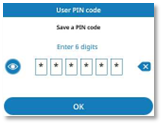
Crear código PIN Se solicitará este código PIN para desbloquear el teléfono de escritorio. ·
Introducir
y confirmar el nuevo código PIN. ·
|
|
|
6 |
|
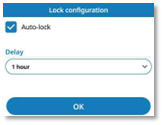
Bloqueo automático (opcional) Puede habilitar la opción de bloqueo automático del teléfono de escritorio transcurrido un período definido de inactividad. ·
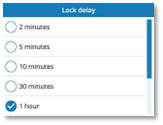
Habilitar o deshabilitar la opción: · Retraso: si la opción de bloqueo automático está habilitada, defina el tiempo tras el cual el teléfono de escritorio se bloqueará automáticamente cuando esté inactivo (2 minutos, 5 minutos, 10 minutos, 30 minutos, 1 hora, 2 horas, 4 horas u 8 horas). ·
|
|
|
7 |
|
Guardar los cambios sin confirmar y volver a la página anterior. |
|
|
o |
|
Utilizar uno de los siguientes: ·
·
|
|




Bloqueo
automático: siempre puede habilitar la
función de bloqueo automático más tarde habilitando la opción en esta página de
configuración:
( ) à
) à  Configuración à Dispositivo à Bloquear
Modificar el código PIN
|
( |
|||
|
|
|||
|
1 |
|
Acceder al menú local de usuario. Con el ALE-500 y el ALE-400, el panel de control le permite acceder directamente al menú local de usuario. |
|
|
2 |
|
Configuración |
|
|
3 |
|
Usuario Abrir la configuración de usuario. La configuración del usuario se muestra de forma predeterminada. |
|
|
4 |
|
Dispositivo à Bloquear |
|
|
5 |
|
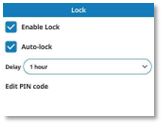
Editar código PIN ·
Introducir el código PIN
actual ·
Introducir
y confirmar el nuevo código PIN. |
|

 /
/ : Seleccione estos iconos para mostrar u ocultar el código
PIN.
: Seleccione estos iconos para mostrar u ocultar el código
PIN.
Más tarde: pulse este botón para cancelar la modificación del código PIN.
Habilitar/deshabilitar la función de bloqueo automático
Puede habilitar o deshabilitar la opción de bloqueo automático del teléfono de escritorio transcurrido un período definido de inactividad.
|
( |
|||
|
|
|||
|
1 |
|
Acceder al menú local de usuario. Con el ALE-500 y el ALE-400, el panel de control le permite acceder directamente al menú local de usuario. |
|
|
2 |
|
Configuración |
|
|
3 |
|
Usuario Abrir la configuración de usuario. La configuración del usuario se muestra de forma predeterminada. |
|
|
4 |
|
Dispositivo à Bloquear |
|
|
6 |
|
Bloqueo automático (opcional) ·
Habilitar o deshabilitar la opción: · Retraso: si la opción de bloqueo automático está habilitada, defina el tiempo tras el cual el teléfono de escritorio se bloqueará automáticamente cuando esté inactivo (2 minutos, 5 minutos, 10 minutos, 30 minutos, 1 hora, 2 horas, 4 horas u 8 horas). |
|
|
7 |
|
Guardar los cambios sin confirmar y volver a la página anterior. |
|
|
o |
|
Utilizar uno de los siguientes: ·
·
|
|


Restablecer el código PIN
Solo el administrador puede restablecer el código PIN. Póngase en contacto con el administrador.
Gestire la funzione di blocco
Per aumentare la sicurezza e la privacy, la funzione di Blocco limita l'accesso all'interfaccia del telefono fisso. Viene richiesto un codice PIN per sbloccare il telefono fisso.
Abilitare la funzione di blocco
|
( |
|||
|
|
|||
|
1 |
|
Accedere al menu utente locale. Con ALE-500 e ALE-400, il dashboard consente di accedere direttamente al menu locale. |
|
|
2 |
|
Impostazioni |
|
|
3 |
|
Utente Aprire le impostazioni utente. Le impostazioni dell'utente sono visualizzate per impostazione predefinita. |
|
|
4 |
|
Dispositivo à Blocca |
|
|
5 |
|
Attiva o disattiva la funzione: |
|
|
|
|
Crea codice PIN Questo codice PIN viene richiesto per sbloccare il telefono fisso. ·
Inserire
e confermare il nuovo codice PIN. ·
|
|
|
6 |
|
Blocco automatico (opzionale) È possibile abilitare l'opzione di blocco automatico del telefono fisso dopo un determinato periodo di inattività. ·
Abilitare o disabilitare
l'opzione: · Ritardo: se l'opzione di blocco automatico è abilitata, definire il ritardo dopo il quale il telefono fisso si blocca automaticamente quando è inattivo (2 minuti, 5 minuti, 10 minuti, 30 minuti, 1 ora, 2 ore, 4 ore o 8 ore). ·
|
|
|
7 |
|
Salvare le modifiche senza confermare e tornare alla pagina precedente. |
|
|
oppure |
|
Utilizzare uno tra i seguenti: ·
·
|
|




Blocco
automatico: è sempre possibile
abilitare la funzione di blocco automatico in un secondo momento, abilitando
l'opzione in questa pagina di impostazioni:
( ) à
) à  Impostazioni à Dispositivo à Blocca
Modificare il codice PIN
|
( |
|||
|
|
|||
|
1 |
|
Accedere al menu utente locale. Con ALE-500 e ALE-400, il dashboard consente di accedere direttamente al menu locale. |
|
|
2 |
|
Impostazioni |
|
|
3 |
|
Utente Aprire le impostazioni utente. Le impostazioni dell'utente sono visualizzate per impostazione predefinita. |
|
|
4 |
|
Dispositivo à Blocca |
|
|
5 |
|
Modifica codice PIN ·
Immettere il codice PIN ·
Inserire
e confermare il nuovo codice PIN. |
|


 /
/ : Selezionare queste icone per mostrare o nascondere il
codice PIN.
: Selezionare queste icone per mostrare o nascondere il
codice PIN.
Più tardi: premere questo pulsante per annullare la modifica del codice PIN.
Abilita/disabilita la funzione di blocco automatico
È possibile abilitare o disabilitare l'opzione di blocco automatico del telefono fisso dopo un determinato periodo di inattività.
|
( |
|||
|
|
|||
|
1 |
|
Accedere al menu utente locale. Con ALE-500 e ALE-400, il dashboard consente di accedere direttamente al menu locale. |
|
|
2 |
|
Impostazioni |
|
|
3 |
|
Utente Aprire le impostazioni utente. Le impostazioni dell'utente sono visualizzate per impostazione predefinita. |
|
|
4 |
|
Dispositivo à Blocca |
|
|
6 |
|
Blocco automatico (opzionale) ·
Abilitare o disabilitare
l'opzione: · Ritardo: se l'opzione di blocco automatico è abilitata, definire il ritardo dopo il quale il telefono fisso si blocca automaticamente quando è inattivo (2 minuti, 5 minuti, 10 minuti, 30 minuti, 1 ora, 2 ore, 4 ore o 8 ore). |
|
|
7 |
|
Salvare le modifiche senza confermare e tornare alla pagina precedente. |
|
|
oppure |
|
Utilizzare uno tra i seguenti: ·
·
|
|


Resettare il codice PIN
Solo l'amministratore può resettare il codice PIN. Contattare l'amministratore.
Gerir a funcionalidade de bloqueio
Para aumentar a sua segurança e privacidade, a funcionalidade de Bloqueio restringe o acesso à interface do telefone de secretária. É pedido um código PIN para desbloquear o telefone de secretária.
Ativar a funcionalidade de bloqueio
|
( |
|||
|
|
|||
|
1 |
|
Aceder ao menu do utilizador local. Com o ALE-500 e o ALE-400, o painel de informações permite-lhe aceder diretamente ao menu local. |
|
|
2 |
|
Definições |
|
|
3 |
|
Utilizador Abrir definições do utilizador. As definições do utilizador são apresentadas por predefinição. |
|
|
4 |
|
Dispositivo à Bloquear |
|
|
5 |
|
Activar ou desactivar a função: |
|
|
|
|
Criar código PIN Este código PIN será solicitado para desbloquear o telefone de secretária. ·
Introduzir
e confirmar o novo código PIN. ·
|
|
|
6 |
|
Bloqueio automático (opcional) Pode ativar a opção de bloquear automaticamente o telefone de secretária após um período definido de inatividade. ·
Ativar ou desativar a
opção: · Atraso: se a opção de bloqueio automático estiver ativada, definir o atraso após o qual o telefone de secretária bloqueará automaticamente quando estiver inativo (2 minutos, 5 minutos, 10 minutos, 30 minutos, 1 hora, 2 horas, 4 horas ou 8 horas). ·
|
|
|
7 |
|
Guardar as alterações sem confirmar e voltar à página anterior. |
|
|
ou |
|
Utilize um(a) do(a)s seguintes: ·
·
|
|




Bloqueio
automático: pode sempre ativar
a funcionalidade de bloqueio automático mais tarde, ativando a opção nesta
página de definições:
( ) à
) à  Definições à Dispositivo à Bloquear
Modificar o código PIN
|
( |
|||
|
|
|||
|
1 |
|
Aceder ao menu do utilizador local. Com o ALE-500 e o ALE-400, o painel de informações permite-lhe aceder diretamente ao menu local. |
|
|
2 |
|
Definições |
|
|
3 |
|
Utilizador Abrir definições do utilizador. As definições do utilizador são apresentadas por predefinição. |
|
|
4 |
|
Dispositivo à Bloquear |
|
|
5 |
|
Editar código PIN ·
Introduzir o código PIN
atual ·
Introduzir
e confirmar o novo código PIN. |
|


 /
/ : Selecionar estes ícones para mostrar ou ocultar o código
PIN.
: Selecionar estes ícones para mostrar ou ocultar o código
PIN.
Mais tarde: premir este botão para cancelar a alteração do código PIN.
Ativar/desativar a funcionalidade de bloqueio automático
Pode ativar ou desativar a opção de bloquear automaticamente o telefone de secretária após um período definido de inatividade.
|
( |
|||
|
|
|||
|
1 |
|
Aceder ao menu do utilizador local. Com o ALE-500 e o ALE-400, o painel de informações permite-lhe aceder diretamente ao menu local. |
|
|
2 |
|
Definições |
|
|
3 |
|
Utilizador Abrir definições do utilizador. As definições do utilizador são apresentadas por predefinição. |
|
|
4 |
|
Dispositivo à Bloquear |
|
|
6 |
|
Bloqueio automático (opcional) ·
Ativar ou desativar a
opção: · Atraso: se a opção de bloqueio automático estiver ativada, definir o atraso após o qual o telefone de secretária bloqueará automaticamente quando estiver inativo (2 minutos, 5 minutos, 10 minutos, 30 minutos, 1 hora, 2 horas, 4 horas ou 8 horas). |
|
|
7 |
|
Guardar as alterações sem confirmar e voltar à página anterior. |
|
|
ou |
|
Utilize um(a) do(a)s seguintes: ·
·
|
|


Redefinir o código PIN
Apenas o administrador pode redefinir o seu código PIN. Contacte o seu administrador.
Kilit özelliğini yönet
Güvenliğinizi ve gizliliğinizi artırmak için Kilit özelliği masa telefonunun arayüzüne erişimi kısıtlar. Masaüstü telefonun kilidini açmak için bir PIN kodu isteniyor.
Kilit özelliğini etkinleştirin
|
( |
|||
|
|
|||
|
1 |
|
Yerel kullanıcı menüsüne erişin. ALE-500 ve ALE-400'de kontrol paneli doğrudan yerel menüye erişmenize olanak tanır. |
|
|
2 |
|
Ayarlar |
|
|
3 |
|
Kullanıcı Kullanıcı ayarlarını seç. Kullanıcı ayarları varsayılan olarak görüntülenir. |
|
|
4 |
|
Cihaz à Kilitle |
|
|
5 |
|
Özelliği etkinleştirme veya devre dışı bırakma: |
|
|
|
|
PIN kodu oluştur Masa telefonunun kilidini açmak için bu PIN kodu istenecektir. ·
Yeni
PIN kodunu girin ve onaylayın. ·
|
|
|
6 |
|
Otomatik kilitleme (isteğe bağlı) Belirli bir süre kullanılmadığında masa telefonunu otomatik olarak kilitleme seçeneğini etkinleştirebilirsiniz. ·
Seçeneği etkinleştirin
veya devre dışı bırakın: · Gecikme: otomatik kilitleme seçeneği etkinse, masa telefonunun etkin olmadığında otomatik olarak kilitleneceği gecikmeyi tanımlayın (2 dakika, 5 dakika, 10 dakika, 30 dakika, 1 saat, 2 saat, 4 saat veya 8 saat). ·
|
|
|
7 |
|
Onaylamadan değişiklikleri kaydet ve önceki sayfaya dön. |
|
|
veya |
|
Aşağıdakilerden birini kullanın: ·
·
|
|




Otomatik
kilitleme: otomatik kilitleme özelliğini
daha sonra bu ayarlar sayfasındaki seçeneği etkinleştirerek her zaman
etkinleştirebilirsiniz:
( ) à
) à  Ayarlar à Cihaz à Kilitle
PIN kodunu değiştir
|
( |
|||
|
|
|||
|
1 |
|
Yerel kullanıcı menüsüne erişin. ALE-500 ve ALE-400'de kontrol paneli doğrudan yerel menüye erişmenize olanak tanır. |
|
|
2 |
|
Ayarlar |
|
|
3 |
|
Kullanıcı Kullanıcı ayarlarını seç. Kullanıcı ayarları varsayılan olarak görüntülenir. |
|
|
4 |
|
Cihaz à Kilitle |
|
|
5 |
|
PIN kodunu düzenle ·
Geçerli PIN kodunu girin ·
Yeni
PIN kodunu girin ve onaylayın. |
|

 /
/ : PİN kodunu göstermek veya gizlemek için bu simgeleri seçin.
Daha sonra: PIN kodu değişikliğini iptal etmek için bu düğmeye basın.
Otomatik kilitleme özelliğini etkinleştir/devre dışı bırak
Belirli bir süre kullanılmadığında masa telefonunun otomatik kilitlenmesini sağlayan seçeneği etkinleştirebilir veya devre dışı bırakabilirsiniz.
|
( |
|||
|
|
|||
|
1 |
|
Yerel kullanıcı menüsüne erişin. ALE-500 ve ALE-400'de kontrol paneli doğrudan yerel menüye erişmenize olanak tanır. |
|
|
2 |
|
Ayarlar |
|
|
3 |
|
Kullanıcı Kullanıcı ayarlarını seç. Kullanıcı ayarları varsayılan olarak görüntülenir. |
|
|
4 |
|
Cihaz à Kilitle |
|
|
6 |
|
Otomatik kilitleme (isteğe bağlı) ·
Seçeneği etkinleştirin
veya devre dışı bırakın: · Gecikme: otomatik kilitleme seçeneği etkinse, masa telefonunun etkin olmadığında otomatik olarak kilitleneceği gecikmeyi tanımlayın (2 dakika, 5 dakika, 10 dakika, 30 dakika, 1 saat, 2 saat, 4 saat veya 8 saat). |
|
|
7 |
|
Onaylamadan değişiklikleri kaydet ve önceki sayfaya dön. |
|
|
veya |
|
Aşağıdakilerden birini kullanın: ·
·
|
|

PIN kodunu sıfırla
Sadece yöneticiniz PIN kodunuzu sıfırlayabilir. Yöneticiniz ile iletişime geçin.
管理锁定功能
为了提高安全性和隐私性,“锁定”功能会限制对桌面话机界面的访问。 解锁桌面话机需要输入 PIN 码。
启用锁定功能
|
( |
|||
|
|
|||
|
1 |
|
访问本地用户菜单。 使用 ALE-500 和 ALE-400 时,仪表板可让您直接访问本地菜单。 |
|
|
2 |
|
设置 |
|
|
3 |
|
用户 打开用户设置。 默认情况下会显示用户设置。 |
|
|
4 |
|
设备 à 锁定 |
|
|
5 |
|
激活或停用该功能: |
|
|
|
|
创建密码 解锁桌面话机时需输入此 PIN 码。 ·
输入并确认新 PIN 码。 ·
|
|
|
6 |
|
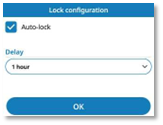
自动锁定 (可选) 您可以启用自动锁定选项,使桌面话机在闲置一段时间后自动锁定。 ·
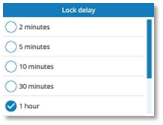
启用或禁用该选项: · 延迟: 若启用了自动锁定选项,请定义在闲置状态下,桌面话机自动锁定前的延迟时间 (2 分钟、5 分钟、10 分钟、30 分钟、1 小时、2 小时、4 小时或 8 小时)。 ·
|
|
|
7 |
|
无需确认即可保存更改并返回上一页。 |
|
|
或 |
|
使用其中以下一项功能: ·
·
|
|




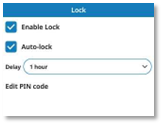
自动锁定: 您可以稍后随时通过在此设置页面中启用该选项来启用自动锁定功能:
( ) à
) à  设置 à 设备 à 锁定
修改 PIN 码
|
( |
|||
|
|
|||
|
1 |
|
访问本地用户菜单。 使用 ALE-500 和 ALE-400 时,仪表板可让您直接访问本地菜单。 |
|
|
2 |
|
设置 |
|
|
3 |
|
用户 打开用户设置。 默认情况下会显示用户设置。 |
|
|
4 |
|
设备 à 锁定 |
|
|
5 |
|
编辑密码 ·
输入当前 PIN 码 ·
输入并确认新 PIN 码。 |
|
 /
/ : 选择这些图标来显示或隐藏 PIN 码。
稍后: 按下此按钮取消 PIN 码修改。
启用/禁用自动锁定功能
您可以启用或禁用自动锁定选项,使桌面话机在闲置一段时间后自动锁定。
|
( |
|||
|
|
|||
|
1 |
|
访问本地用户菜单。 使用 ALE-500 和 ALE-400 时,仪表板可让您直接访问本地菜单。 |
|
|
2 |
|
设置 |
|
|
3 |
|
用户 打开用户设置。 默认情况下会显示用户设置。 |
|
|
4 |
|
设备 à 锁定 |
|
|
6 |
|
自动锁定 (可选) ·
启用或禁用该选项: · 延迟: 若启用了自动锁定选项,请定义在闲置状态下,桌面话机自动锁定前的延迟时间 (2 分钟、5 分钟、10 分钟、30 分钟、1 小时、2 小时、4 小时或 8 小时)。 |
|
|
7 |
|
无需确认即可保存更改并返回上一页。 |
|
|
或 |
|
使用其中以下一项功能: ·
·
|
|


重置 PIN 码
仅管理员可以重置您的 PIN 码。 请联系您的管理员。