
Programmable permanent keys
You can customize up to two of the following permanent keys to assign frequently used functions, such as Emergency, Guard, Welcome Desk, Search, Contacts, Redial, or any other available feature:
·
ALE-300:  ,
,  ,
,  .
.
·
ALE-400:  ,
,  ,
,  .
.
·
ALE-500:  ,
,  ,
,  .
.
Program a permanent key
|
Use one of the following: · Long press on the permanent key to be programmed. ·
( |
||
|
|
||
|
1 |
|
Access the local user menu. With the ALE-500 and ALE-400, the dashboard lets you access directly to the local menu. |
|
2 |
|
Settings |
|
3 |
|
User Open user settings. The user settings are displayed by default. |
|
4 |
|
Device à Hard keys |


|
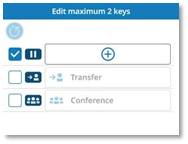
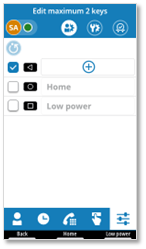
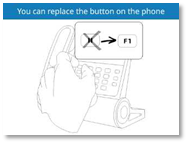
The desk phone displays the programmable permanent keys according to your desk phone model. You can program up to two of the three available programmable keys.
|
|
|
·
·
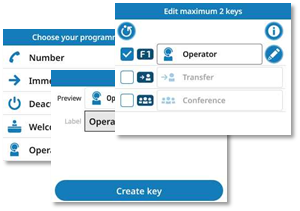
· Choose a function. · Enter information about the key (label or number, depending on the function). ·
· The function is assigned to the key. |
|
|
ALE-400/ALE-300 |
|
|
|
|
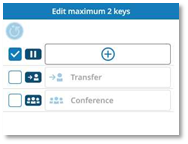
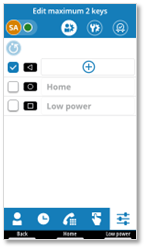


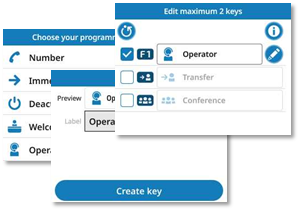

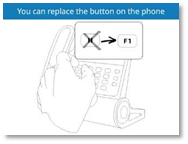
Modify a customized permanent key
· Use one of the following:
o Long press on the key to modify.
o
( ) à
) à  Settings à Device à Hard keys
·
 : To switch to edit mode. Only editable
keys can be selected.
: To switch to edit mode. Only editable
keys can be selected.
· Modify information.
·
 or Update
key: confirm change.
or Update
key: confirm change.
( or
or  : go back without saving).
 Delete key: you can also delete the programmable key
from the edit mode.
Delete key: you can also delete the programmable key
from the edit mode.
Restore the default keys
· Use one of the following:
o Long press on the key to modify.
o
( ) à
) à  Settings à Device à Hard keys
· You can restore the key's default function using one of the following options:
o
 : Uncheck
the key. You can reactivate the function at any time without having to
reprogram the key.
: Uncheck
the key. You can reactivate the function at any time without having to
reprogram the key.
o
 : To switch to edit mode.
Delete key: Delete the function assigned to the key (see below).
 Select this icon to delete all assigned
features and restore all the keys to their default functions (Hold, Transfer,
and Conference).
Select this icon to delete all assigned
features and restore all the keys to their default functions (Hold, Transfer,
and Conference).
Touches permanentes programmables
Vous pouvez personnaliser jusqu'à deux des touches permanentes suivantes pour leur attribuer des fonctions fréquemment utilisées, telles que Urgence, Mise en garde, Bureau d'accueil, Recherche, Contacts, Recomposition ou toute autre fonction disponible :
·
ALE-300 :  ,
,  ,
,  .
.
·
ALE-400 :  ,
,  ,
,  .
.
·
ALE-500 :  ,
,  ,
,  .
.
Programmer une touche permanente
|
Utilisez l'une des options suivantes : · Appui long sur la touche permanente à programmer. ·
( |
||
|
|
||
|
1 |
|
Accéder au menu local de l'utilisateur. Avec l'ALE-500 et l'ALE-400, le tableau de bord vous permet d'accéder directement au menu local. |
|
2 |
|
Réglages |
|
3 |
|
Utilisateur Ouvrir les paramètres de l'utilisateur. Les paramètres utilisateur sont affichés par défaut. |
|
4 |
|
Appareil à Touches physiques |


|
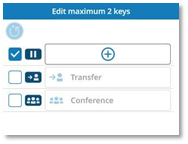
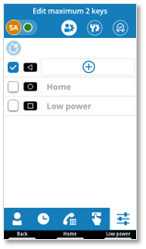
Le téléphone de bureau affiche les touches permanentes programmables selon le modèle de votre téléphone de bureau. Vous pouvez programmer jusqu'à deux des trois touches programmables disponibles.
|
|
|
·
·
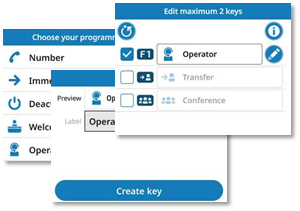
· Choisir une fonction. · Saisir des informations relative à la touche (étiquette ou numéro, selon la fonction). ·
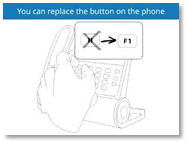
· La fonction est attribuée à la touche. |
|
|
ALE-400/ALE-300 |
|
|
|
|



Modifier une touche permanente personnalisée
· Utilisez l'une des options suivantes :
o Appui long sur la touche pour modifier.
o
( ) à
) à  Réglages à Appareil à Touches physiques
·
 : Pour passer en mode édition. Seules les touches
modifiables peuvent être sélectionnées.
: Pour passer en mode édition. Seules les touches
modifiables peuvent être sélectionnées.
· Modifier les informations.
·
 ou Mettre à jour
: confirmer le changement.
ou Mettre à jour
: confirmer le changement.
( ou
ou  : revenir sans enregistrer).
 Supprimer : vous pouvez également supprimer la
touche programmable du mode d'édition.
Supprimer : vous pouvez également supprimer la
touche programmable du mode d'édition.
Restaurer les touches par défaut
· Utilisez l'une des options suivantes :
o Appui long sur la touche pour modifier.
o
() à  Réglages à Appareil à Touches physiques
· Vous pouvez rétablir la fonction par défaut de la touche en utilisant l'une des options suivantes :
o
 : Décocher la touche. Vous
pouvez réactiver la fonction à tout moment sans avoir à reprogrammer la touche.
: Décocher la touche. Vous
pouvez réactiver la fonction à tout moment sans avoir à reprogrammer la touche.
o
 : Pour passer en mode édition.
 Supprimer : Supprimer
la fonction attribuée à la touche (voir ci-dessous).
Supprimer : Supprimer
la fonction attribuée à la touche (voir ci-dessous).
 Sélectionner cette icône pour supprimer toutes les fonctions
attribuées et rétablir les fonctions par défaut de toutes les touches (Mise en
attente, Transfert et Conférence).
Sélectionner cette icône pour supprimer toutes les fonctions
attribuées et rétablir les fonctions par défaut de toutes les touches (Mise en
attente, Transfert et Conférence).
Programmierbare permanente Tasten
Sie können bis zu zwei der folgenden permanenten Tasten mit häufig verwendeten Funktionen belegen, z. B. Notruf, Wache, Welcome Desk, Suche, Kontakte, Wahlwiederholung oder andere verfügbare Funktionen:
·
ALE-300:  ,
,  ,
,  .
.
·
ALE-400:  ,
,  ,
,  .
.
·
ALE-500:  ,
,  ,
,  .
.
Programmieren Sie eine permanente Taste
|
Verwenden Sie eine der folgenden Möglichkeiten: · Langes Drücken auf die zu programmierende permanente Taste. ·
( |
||
|
|
||
|
1 |
|
Auf das lokale Benutzermenü zugreifen. Beim ALE-500 und ALE-400 bietet das Dashboard Ihnen direkten Zugriff auf das lokale Menü. |
|
2 |
|
Einstellungen |
|
3 |
|
Benutzer Benutzereinstellungen öffnen. Die Benutzereinstellungen werden standardmäßig angezeigt. |
|
4 |
|
Gerät à Physische Tasten |


|
Das Tischtelefon zeigt die programmierbaren festen Tasten entsprechend dem Modell Ihres Tischtelefons an. Sie können bis zu zwei der drei verfügbaren programmierbaren Tasten programmieren.
|
|
|
·
·
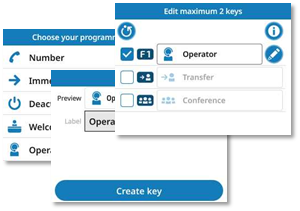
· Wählen Sie eine Funktion. · Geben Sie Informationen über die Taste ein (Bezeichnung oder Nummer, je nach Funktion). ·
· Die Funktion ist der Taste zugewiesen. |
|
|
ALE-400/ALE-300 |
|
|
|
|



Ändern Sie eine benutzerdefinierte permanente Taste
· Verwenden Sie eine der folgenden Möglichkeiten:
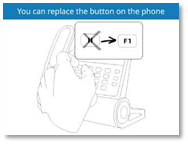
o Drücken Sie zum Ändern lange auf die Taste.
o
( ) à
) à  Einstellungen à Gerät à Physische Tasten
·
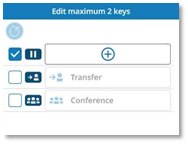
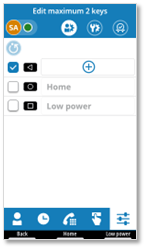
 : Um in den Bearbeitungsmodus zu wechseln,. Nur
bearbeitbare Tasten können ausgewählt werden.
: Um in den Bearbeitungsmodus zu wechseln,. Nur
bearbeitbare Tasten können ausgewählt werden.
· Informationen ändern.
·
 oder Taste aktualisieren: Änderung bestätigen.
( oder
oder  : ohne Speichern zurückspringen).
 Taste löschen: Sie können die programmierbare Taste
auch aus dem Bearbeitungsmodus löschen.
Taste löschen: Sie können die programmierbare Taste
auch aus dem Bearbeitungsmodus löschen.
Stellen Sie die Standardtasten wieder her
· Verwenden Sie eine der folgenden Möglichkeiten:
o Drücken Sie zum Ändern lange auf die Taste.
o
( ) à
) à  Einstellungen à Gerät à Physische Tasten
· Sie können die Standardfunktion der Taste mit einer der folgenden Optionen wiederherstellen:
o
 : Deaktivieren
Sie die Taste. Sie können die Funktion jederzeit wieder aktivieren, ohne die
Taste neu programmieren zu müssen.
: Deaktivieren
Sie die Taste. Sie können die Funktion jederzeit wieder aktivieren, ohne die
Taste neu programmieren zu müssen.
o
 : Um in den Bearbeitungsmodus zu wechseln,.
Taste löschen: Löschen Sie die der Taste zugewiesene Funktion (siehe
unten).
 Wählen Sie dieses Symbol, um alle zugewiesenen
Funktionen zu löschen und alle Tasten auf ihre Standardfunktionen (Halten,
Übergeben und Konferenz) zurückzusetzen.
Wählen Sie dieses Symbol, um alle zugewiesenen
Funktionen zu löschen und alle Tasten auf ihre Standardfunktionen (Halten,
Übergeben und Konferenz) zurückzusetzen.
Teclas programables permanentes
Puede personalizar hasta dos de las siguientes teclas permanentes para asignarles funciones de uso frecuente, como emergencia, guardia, recepción, búsqueda, contactos, rellamada o cualquier otra función disponible:
·
ALE-300:  ,
,  ,
,  .
.
·
ALE-400:  ,
,  ,
,  .
.
·
ALE-500:  ,
,  ,
,  .
.
Programar una tecla permanente
|
Utilizar uno de los siguientes: · Pulsar prolongadamente la tecla permanente que se va a programar. ·
( |
||
|
|
||
|
1 |
|
Acceder al menú local de usuario. Con el ALE-500 y el ALE-400, el panel de control le permite acceder directamente al menú local de usuario. |
|
2 |
|
Configuración |
|
3 |
|
Usuario Abrir la configuración de usuario. La configuración del usuario se muestra de forma predeterminada. |
|
4 |
|
Dispositivo à Botones físicos |


|
El teléfono de escritorio muestra las teclas programables permanentes según el modelo de su teléfono de escritorio. Puede programar hasta dos de las tres teclas programables disponibles.
|
|
|
·
·
· Elija una función. · Introduzca información sobre la tecla (etiqueta o número, según la función). ·
· La función se ha asignado a la tecla. |
|
|
ALE-400/ALE-300 |
|
|
|
|
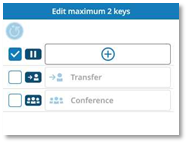
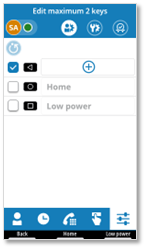


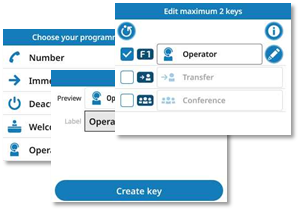

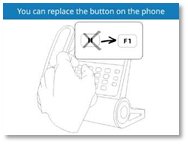
Modificar una tecla permanente personalizada
· Utilizar uno de los siguientes:
o Mantenga pulsada la tecla para modificarla.
o
( ) à
) à  Configuración à Dispositivo à Botones físicos
·
 : Para cambiar al modo de edición. Solo se
pueden seleccionar las teclas editables.
: Para cambiar al modo de edición. Solo se
pueden seleccionar las teclas editables.
· Modifique la información.
·
 o Actualizar
tecla: confirme el cambio.
o Actualizar
tecla: confirme el cambio.
( o
o  : volver sin guardar).
 Borrar tecla: también puede eliminar la tecla
programable desde el modo de edición.
Borrar tecla: también puede eliminar la tecla
programable desde el modo de edición.
Restablecer las teclas predeterminadas
· Utilizar uno de los siguientes:
o Mantenga pulsada la tecla para modificarla.
o
() à  Configuración à Dispositivo à Botones físicos
· Puede restablecer la función predeterminada de la tecla utilizando una de las siguientes opciones:
o
 : Desmarque la tecla. Puede
reactivar la función en cualquier momento sin tener que reprogramar la tecla.
: Desmarque la tecla. Puede
reactivar la función en cualquier momento sin tener que reprogramar la tecla.
o
 : Para cambiar al modo de edición.
 Borrar
tecla: Elimine la función asignada a la
tecla (ver abajo).
Borrar
tecla: Elimine la función asignada a la
tecla (ver abajo).
 Seleccione este icono para eliminar todas
las funciones asignadas y restablecer todas las teclas en sus funciones
predeterminadas (espera, transferencia y conferencia).
Seleccione este icono para eliminar todas
las funciones asignadas y restablecer todas las teclas en sus funciones
predeterminadas (espera, transferencia y conferencia).
Tasti permanenti programmabili
È possibile personalizzare fino a due dei seguenti tasti permanenti per assegnare funzioni di uso frequente, come Emergenza, Guardia, Welcome Desk, Ricerca, Contatti, Riselezione o qualsiasi altra funzione disponibile:
·
ALE-300:  ,
,  ,
,  .
.
·
ALE-400: , , .
·
ALE-500:  ,
,  ,
,  .
.
Programmare anche un tasto permanente
|
Utilizzare uno tra i seguenti: · Premere a lungo il tasto permanente da programmare. ·
( |
||
|
|
||
|
1 |
|
Accedere al menu utente locale. Con ALE-500 e ALE-400, il dashboard consente di accedere direttamente al menu locale. |
|
2 |
|
Impostazioni |
|
3 |
|
Utente Aprire le impostazioni utente. Le impostazioni dell'utente sono visualizzate per impostazione predefinita. |
|
4 |
|
Dispositivo à Pulsanti fisici |


|
Il telefono fisso visualizza i tasti permanenti programmabili in base al modello di telefono fisso in uso. Si possono programmare fino a due dei tre tasti programmabili disponibili.
|
|
|
·
·
· Scegliere una funzione. · Inserire le informazioni relative al tasto (etichetta o numero, a seconda della funzione). ·
· La funzione è assegnata al tasto. |
|
|
ALE-400/ALE-300 |
|
|
|
|
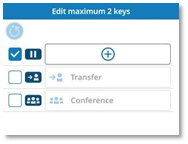
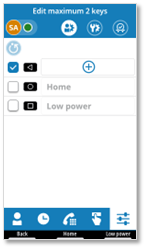


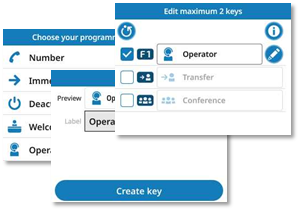

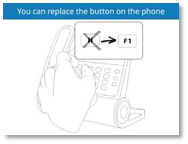
Modificare un tasto permanente personalizzato
· Utilizzare uno tra i seguenti:
o Premere a lungo sul tasto per modificarlo.
o
( ) à
) à  Impostazioni à Dispositivo à Pulsanti fisici
·
 : Per passare alla modalità di modifica. È
possibile selezionare solo i tasti modificabili.
: Per passare alla modalità di modifica. È
possibile selezionare solo i tasti modificabili.
· Modificare le informazioni.
·
 oppure Aggiorna
tasto: confermare la modifica.
oppure Aggiorna
tasto: confermare la modifica.
( oppure
  : torna indietro senza salvare).
 Elimina tasto: è possibile eliminare il
tasto programmabile anche dalla modalità di modifica.
Elimina tasto: è possibile eliminare il
tasto programmabile anche dalla modalità di modifica.
Ripristinare i tasti predefiniti
· Utilizzare uno tra i seguenti:
o Premere a lungo sul tasto per modificarlo.
o
() à Impostazioni à Dispositivo à Pulsanti fisici
· È possibile ripristinare la funzione predefinita del tasto utilizzando una delle seguenti opzioni:
o
 : Deselezionare
il tasto. È possibile riattivare la funzione in qualsiasi momento senza dover
riprogrammare il tasto.
: Deselezionare
il tasto. È possibile riattivare la funzione in qualsiasi momento senza dover
riprogrammare il tasto.
o
 : Per passare alla modalità di modifica.
 Elimina
tasto: Cancellare la funzione assegnata al
tasto (vedi sotto).
Elimina
tasto: Cancellare la funzione assegnata al
tasto (vedi sotto).
 Selezionare questa icona per cancellare
tutte le funzioni assegnate e ripristinare tutti i tasti alle loro funzioni
predefinite (Attesa, Trasferimento e Conferenza).
Selezionare questa icona per cancellare
tutte le funzioni assegnate e ripristinare tutti i tasti alle loro funzioni
predefinite (Attesa, Trasferimento e Conferenza).
Teclas permanentes programáveis
Pode personalizar até duas das seguintes teclas permanentes para atribuir funções frequentemente utilizadas, tais como Emergência, Guarda, Receção de boas-vindas, Pesquisa, Contactos, Remarcação ou qualquer outra funcionalidade disponível:
·
ALE-300:  ,
,  ,
,  .
.
·
ALE-400:  ,
,  ,
,  .
.
·
ALE-500:  ,
,  ,
,  .
.
Programar uma tecla permanente
|
Utilize um(a) do(a)s seguintes: · Pressão longa numa tecla permanente a programar. ·
( |
||
|
|
||
|
1 |
|
Aceder ao menu do utilizador local. Com o ALE-500 e o ALE-400, o painel de informações permite-lhe aceder diretamente ao menu local. |
|
2 |
|
Definições |
|
3 |
|
Utilizador Abrir definições do utilizador. As definições do utilizador são apresentadas por predefinição. |
|
4 |
|
Dispositivo à Botões físicos |


|
O telefone de secretária apresenta as teclas permanentes programáveis de acordo com o seu modelo de telefone de secretária. Pode programar até duas ou três das teclas programáveis disponíveis.
|
|
|
·
·
· Escolher uma função. · Introduzir informações sobre a tecla (etiqueta ou número, consoante a função). ·
· A função é atribuída à tecla. |
|
|
ALE-400/ALE-300 |
|
|
|
|



Modificar uma tecla permanente personalizada
· Utilize um(a) do(a)s seguintes:
o Premir demoradamente a tecla para modificar.
o
( ) à
) à  Definições à Dispositivo à Botões físicos
·
 : Para passar para o modo editar. Apenas
podem ser selecionadas as teclas editáveis.
: Para passar para o modo editar. Apenas
podem ser selecionadas as teclas editáveis.
· Modificar informações.
·
 ou Atualizar
chave: confirmar a alteração.
ou Atualizar
chave: confirmar a alteração.
( ou
ou  : retroceder sem guardar).
 Eliminar chave: também pode eliminar a tecla
programável do modo de edição.
Eliminar chave: também pode eliminar a tecla
programável do modo de edição.
Restaurar as teclas predefinidas
· Utilize um(a) do(a)s seguintes:
o Premir demoradamente a tecla para modificar.
o
() à Definições à Dispositivo à Botões físicos
· Pode repor a função predefinida da tecla utilizando uma das seguintes opções:
o
 : Desmarcar
a tecla. Pode reativar a função a qualquer momento sem ter de reprogramar a
tecla.
: Desmarcar
a tecla. Pode reativar a função a qualquer momento sem ter de reprogramar a
tecla.
o
 : Para passar para o modo editar.
Eliminar
chave: Eliminar a função atribuída à tecla (ver
abaixo).
 Selecionar este ícone para eliminar todas
as funcionalidades atribuídas e repor todas as teclas nas suas funções
predefinidas (Em espera, Transferência e Conferência).
Selecionar este ícone para eliminar todas
as funcionalidades atribuídas e repor todas as teclas nas suas funções
predefinidas (Em espera, Transferência e Conferência).
Programlanabilir sabit anahtarlar
Acil Durum, Koruma, Karşılama Masası, Arama, Kişiler, Tekrar Arama veya diğer mevcut özellikler gibi sık kullanılan işlevleri atamak için aşağıdaki kalıcı tuşlardan en fazla iki tanesini özelleştirebilirsiniz:
·
ALE-300:  ,
,  ,
,  .
.
·
ALE-400: , , .
·
ALE-500:  ,
,  ,
,  .
.
Kalıcı bir anahtar programlama
|
Aşağıdakilerden birini kullanın: · Programlanacak kalıcı tuşa uzun basın. ·
( |
||
|
|
||
|
1 |
|
Yerel kullanıcı menüsüne erişin. ALE-500 ve ALE-400'de kontrol paneli doğrudan yerel menüye erişmenize olanak tanır. |
|
2 |
|
Ayarlar |
|
3 |
|
Kullanıcı Kullanıcı ayarlarını seç. Kullanıcı ayarları varsayılan olarak görüntülenir. |
|
4 |
|
Cihaz à Fiziksel tuşlar |


|
Masa telefonu, masa telefonu modelinize göre programlanabilir kalıcı tuşları görüntüler. Mevcut üç programlanabilir tuştan en fazla ikisini programlayabilirsiniz.
|
|
|
·
·
· Bir işlev seçin. · Tuşla ilgili bilgileri girin (işleve bağlı olarak etiket veya numara). ·
· Işlev tuşa atanır. |
|
|
ALE-400/ALE-300 |
|
|
|
|
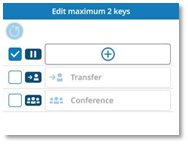
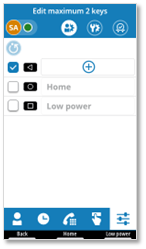


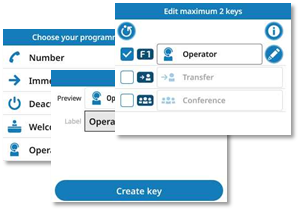

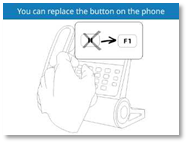
Özelleştirilmiş bir kalıcı anahtarı değiştirme
· Aşağıdakilerden birini kullanın:
o Değiştirmek için tuşa uzun basın.
o
( ) à
) à  Ayarlar à Cihaz à Fiziksel tuşlar
·
 : Düzenleme moduna geçmek için. Yalnızca
düzenlenebilir tuşlar seçilebilir.
: Düzenleme moduna geçmek için. Yalnızca
düzenlenebilir tuşlar seçilebilir.
· Bilgileri değiştir.
·
 veya Anahtarı
güncelle: değişikliği onaylayın.
veya Anahtarı
güncelle: değişikliği onaylayın.
( veya
veya  : kaydetmeden geri git).
 Anahtarı sil: programlanabilir tuşu düzenleme modundan
da silebilirsiniz.
Anahtarı sil: programlanabilir tuşu düzenleme modundan
da silebilirsiniz.
Varsayılan anahtarları geri yükleme
· Aşağıdakilerden birini kullanın:
o Değiştirmek için tuşa uzun basın.
o
( ) à Ayarlar à Cihaz à Fiziksel tuşlar
· Aşağıdaki seçeneklerden birini kullanarak tuşun varsayılan işlevini geri yükleyebilirsiniz:
o
 : Anahtarın
işaretini kaldırın. Anahtarı yeniden programlamak zorunda kalmadan istediğiniz
zaman işlevi yeniden etkinleştirebilirsiniz.
: Anahtarın
işaretini kaldırın. Anahtarı yeniden programlamak zorunda kalmadan istediğiniz
zaman işlevi yeniden etkinleştirebilirsiniz.
o
 : Düzenleme moduna geçmek için.
 Anahtarı
sil: Tuşa atanan işlevi silme (aşağıya bakın).
Anahtarı
sil: Tuşa atanan işlevi silme (aşağıya bakın).
 Atanmış tüm özellikleri silmek ve tüm
tuşları varsayılan işlevlerine (Bekletme, Aktarma ve Konferans) geri yüklemek
için bu simgeyi seçin.
Atanmış tüm özellikleri silmek ve tüm
tuşları varsayılan işlevlerine (Bekletme, Aktarma ve Konferans) geri yüklemek
için bu simgeyi seçin.
可编程固定键
您可以定制以下最多两个固定键,用于分配常用功能,如紧急呼叫、警卫呼叫、迎宾台、搜索、联系人、重拨或任何其他可用功能:
·
ALE-300:  ,
,  ,
,  。
。
·
ALE-400: , , 。
·
ALE-500:  ,
,  ,
,  。
。
为固定键编程
|
使用其中以下一项功能: · 长按待编程的固定键。 ·
( |
||
|
|
||
|
1 |
|
访问本地用户菜单。 使用 ALE-500 和 ALE-400 时,仪表板可让您直接访问本地菜单。 |
|
2 |
|
设置 |
|
3 |
|
用户 打开用户设置。 默认情况下会显示用户设置。 |
|
4 |
|
设备 à 按键 |


|
桌面话机将根据型号显示可编程固定键。 在三个可用可编程键中,您最多可以编程两个。
|
|
|
·
·
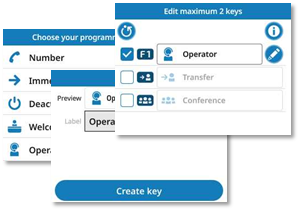
· 选择一项功能。 · 输入按键信息(取决于功能,输入标签或号码)。 ·
· 功能已分配至该键。 |
|
|
ALE-400/ALE-300 |
|
|
|
|



修改已定制的固定键
· 使用其中以下一项功能:
o 长时间按住该键进行修改。
o
( ) à
) à  设置 à 设备 à 按键
·
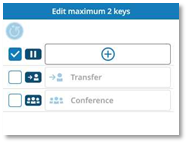
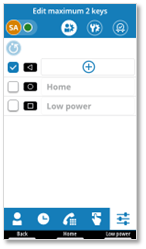
 : 切换至编辑模式。 只能选择可编辑的密钥。
· 修改信息。
·
 或 更新编程键: 确认更改。
( 或
或  : 返回而不保存)。
 删除编程键: 你也可以从编辑模式中删除可编程键。
恢复默认按键
· 使用其中以下一项功能:
o 长时间按住该键进行修改。
o
( ) à
) à  设置 à 设备 à 按键
· 您可以通过以下选项之一恢复按键的默认功能:
o
 : 取消选中该键。 您可以随时重新激活该功能,无需重新编程按键。
o
 : 切换至编辑模式。
 删除编程键: 删除分配给该键的功能 (请看下方)。
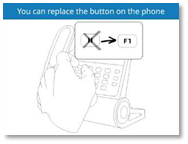
 选择此图标可删除所有已分配的功能,并将所有按键恢复为默认功能(保留、转移和会议)。